Release 12.3.12
12.3.12.11
New Import and Export Tasks for Items and Modifiers
InfoGenesis POS has been enhanced to support new import and export tasks for the following menus using .csv files:
-
Item
-
Modifier
Earlier, these tasks were handled using .txt files. The import sequence for .csv files differs from the sequence followed for .txt files. The following sections provide information on the appropriate sequence to be used for .csv file imports.
Item
Item Export
The Item Export is used to export items from IGCM into a .csv file. The name of the file is MI_Exp and exported to the following location: <Drive>\InfoGenesis\etenant_id\enterprise_id\Division_id\Store_id.
Parent enterprise users can export base and group item records based on the selection in the CCM2 Group drop-down list (Reports ➜ Scheduling ➜ Task Setup ➜ Item Export).
The following table provides information on the export specifications:
|
Sequence |
Field Name |
Valid Data |
Format |
Description |
|---|---|---|---|---|
|
1 |
Action |
U |
Text |
U - To add a new item or update fields in an existing item. If the entered item ID already exists, the appropriate item record gets updated. If the entered item ID does not exist, a new item is added. |
|
2 |
Item ID |
1-999,999,999 |
Numeric |
The item ID. |
|
3 |
Item Name |
1-50 |
Text |
The item name. |
|
4 |
Price Levels |
0-999,999,999 |
Numeric/Text |
Array indicating the price level in the following format: {action,price level ID,current price,store ID} Multiple values can be entered as comma-separated vales. Example: {U,3,10.5,1},{U,4,50,2} |
|
5 |
Store ID |
1-255 |
Numeric |
The store ID. |
|
6 |
Covers |
0-25 |
Numeric |
The cover count. |
|
7 |
Global ID |
0-99,999 |
Numeric |
Indicates the global item ID. |
|
8 |
Bar Gun Code |
1-32767 |
Numeric |
The bar gun code of the item. |
|
9 |
Non-Taxable Amount |
0-9,999,999 |
Numeric |
The non-taxable amount of the item. |
|
10 |
Description |
0-1000 |
Text |
The description of the item. |
|
11 |
Button Text 1 |
1-16 |
Text |
The button text 1. |
|
12 |
Button Text 2 |
0-16 |
Text |
The button text 2. |
|
13 |
Customer Receipt Text |
1-16 |
Text |
The item name to be printed on the receipt. |
|
14 |
Kitchen Printer Text |
0-16 |
Text |
The item name to be printed on the kitchen printer. |
|
15 |
Kitchen Video Text |
0-20 |
Text |
The item name to be printed on the kitchen video. |
|
16 |
Discountable |
0 or 1 |
Numeric |
|
|
17 |
Voidable |
0 or 1 |
Numeric |
|
|
18 |
Tax Included |
0 or 1 |
Numeric |
|
|
19 |
Stock Item |
0 or 1 |
Numeric |
|
|
20 |
Prompt for Name |
0 or 1 |
Numeric |
|
|
21 |
Prompt for Price |
0 or 1 |
Numeric |
|
|
22 |
Print on Check |
0 or 1 |
Numeric |
|
|
23 |
Allow Price Override |
0 or 1 |
Numeric |
|
|
24 |
Product Class |
1-9999 |
Numeric |
The product class ID. |
|
25 |
Revenue Category |
1-999 |
Numeric |
The revenue category ID. |
|
26 |
Tax Group |
1-255 |
Numeric |
The tax group ID. |
|
27 |
Item Group |
1-9999 |
Numeric |
The item group ID. |
|
28 |
Security Level |
0-9 |
Numeric |
The security level. |
|
29 |
Report Category |
1-255 |
Numeric |
The report category ID. |
|
30 |
Coursing |
0-9999 |
Numeric |
The coursing ID. |
|
31 |
Primary Tax Code |
100 characters |
Numeric |
The primary tax code for the item, used for fiscal purposes. |
|
32 |
Kitchen Department |
0-999 |
Numeric |
The kitchen department ID. |
|
33 |
Cook Time |
Time |
Numeric |
The cook time of the item in a department. |
|
34 |
Stage Number |
0-9999 |
Numeric |
The stage number assigned to the department, used in multi station routing. |
|
35 |
Kitchen Sequence |
0-9999 |
Numeric |
The kitchen sequence of the item. |
|
36 |
Choice Group |
0-9999 |
Numeric/Text |
Array indicating the choice group in the following format: {action, choicegroup ID, sequence} Multiple values can be entered as comma-separated values. Example: {U,2,1},{U,3,2} |
|
37 |
Prompt for Sizes |
0 or 1 |
Numeric |
|
|
38 |
Quantity Category |
0 - 999,999,999.999 |
Numeric |
Array indicating the quantity category in the following format: {action,quantity category ID,is quantity override,quantity multiple,is pride override,price multiple, default} Multiple values can be entered as comma-separated values. Example: {U,1,1,8.5,1,5.5,1} |
|
39 |
SKU |
|
Numeric/Text |
Array indicating SKU in the following format: {action, “SKU”,“description”} Example: {U,”23ZUK”,”Desc”} |
|
40 |
Tare Weight |
0-999,999 |
Numeric |
The tare weight, if the item is sold by weight. |
|
41 |
Weight Unit |
0-999 |
Text |
The unit to measure item weight. |
|
42 |
Cost |
0-999,999,999 |
Numeric |
The item’s cost per unit. |
|
43 |
Max Item Price |
0-99,999,999.99 |
Numeric |
The maximum item price for replace item functionality. |
|
44 |
Replace Item |
0-999,999,999 |
Numeric |
The item ID (replace item). |
|
45 |
Kitchen Video Category ID |
0-999 |
Numeric |
The kitchen video category ID. |
|
46 |
Kitchen Video Department ID |
0-999 |
Numeric |
The kitchen video department ID. |
|
47 |
Cook Time |
Time |
Numeric |
Kitchen cook time. |
|
48 |
Kitchen Printer (Logical) |
1-255 |
Numeric/Text |
Array indicating kitchen printer in the following format. {action,kitchen printer ID,primary flag} Multiple values can be entered as comma-separated values. Example: {U,1,0},{U,2,1} |
|
49 |
Tags |
1-999 |
Numeric |
Array indicating tags in the following format. {action,tag ID,sequence} Multiple values can be entered as comma-separated values. Example: {U,1,0},{U,2,1} |
|
50 |
Kitchen Special Tags |
0-10 |
Numeric |
Kitchen special tags. |
|
51 |
Allergen |
0-9999 |
Numeric |
Array indicating the allergen in the following format: {action,allergen ID} Multiple values can be entered as comma-separated values. Example: {U,1},{U,4} |
|
52 |
Base Calories |
0-999,999 |
Numeric |
Base calories of the item. |
|
53 |
Max Calories |
0-999,999 |
Numeric |
Max calories of the item. |
|
54 |
Menu Filter |
0-255 |
Numeric |
Array indicating the menu filter in the following format: {action,menu filter} Multiple values can be entered as comma-separated values. Example: {U,1},{U,4} |
|
55 |
Kiosk Display Name |
0-500 |
Text |
Item display name. |
|
56 |
Preselected Modifiers |
|
Numeric |
Array indicating preselected modifiers in the following format: {action,choice group ID,modifier ID,preselected flag} Multiple values can be entered as comma-separated values. Example: {U,3,60,0},{U,3,61,1} |
|
57 |
Hide in POS |
0 or 1 |
Numeric |
|
|
58 |
Read Only in Child Enterprise |
0 or 1 |
Numeric |
|
|
59 |
Exclude for Child Enterprise |
0 or 1 |
Numeric |
|
|
60 |
Translation |
|
Text |
Array indicating translations for the item record in the following format: {“language ISO code”, “item name”,“button text 1”,“button text 2”,“kitchen printer text”,“receipt text”,“kitchen video text”,“description”,“display name”} Multiple values can be entered as comma-separated values. Example: {“fr-fr”,“chicken burger”,“chicken”,“burger”,“chburger”,“chburger”, “chburger”,“burger”,“chickenburger”} |
In arrays, double quotes (“ ”) are used only for character (string) values and numeric values are not enclosed with double quotes.
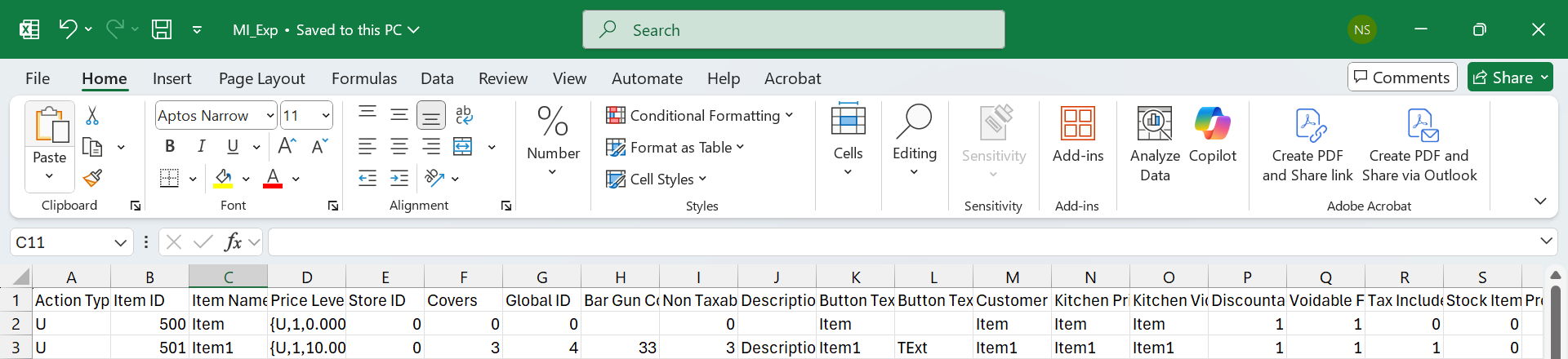
Sample Item Export
Item Import
The Item Import is used to import item records to the Item menu in IGCM using a .csv file. The name of the file is MI_Imp and placed in the following location: <Drive>\InfoGenesis\itenant_id\enterprise_id\Division_id\Store_id.
Parent enterprise users can import item data to base and group records based on the selection in the CCM2 Group drop-down list (Reports ➜ Scheduling ➜ Task Setup ➜ Item Import).
It is recommended to first export the .csv file and then perform import by modifying the exported file.
The following table provides information on the import specifications:
|
Sequence |
Field Name |
Valid Data |
Format |
Required |
Description |
|---|---|---|---|---|---|
|
1 |
Action |
U or D |
Text |
Yes |
|
|
2 |
Item ID |
1-999,999,999 |
Numeric |
Yes |
The item ID. |
|
3 |
Item Name |
1-50 |
Text |
Optional |
The item name. |
|
4 |
Price Levels |
0-999,999,999 |
Numeric/Text |
Optional |
Array indicating the price level in the following format: {action,price level ID,current price,store ID} Multiple values can be entered as comma-separated vales. Example: {U,3,10.5,1},{U,4,50,2} |
|
5 |
Store ID |
1-255 |
Numeric |
Optional |
The store ID. |
|
6 |
Covers |
0-25 |
Numeric |
Optional |
The cover count. |
|
7 |
Global ID |
0-99,999 |
Numeric |
Optional |
Indicates the global item ID. |
|
8 |
Bar Gun Code |
1-32767 |
Numeric |
Optional |
The bar gun code of the item. |
|
9 |
Non-Taxable Amount |
0-9,999,999 |
Numeric |
Optional |
The non-taxable amount of the item. |
|
10 |
Description |
0-1000 |
Text |
Optional |
The description of the item. |
|
11 |
Button Text 1 |
1-16 |
Text |
Optional |
The button text 1. |
|
12 |
Button Text 2 |
0-16 |
Text |
Optional |
The button text 2. |
|
13 |
Customer Receipt Text |
1-16 |
Text |
Optional |
The item name to be printed on the receipt. |
|
14 |
Kitchen Printer Text |
0-16 |
Text |
Optional |
The item name to be printed on the kitchen printer. |
|
15 |
Kitchen Video Text |
0-20 |
Text |
Optional |
The item name to be printed on the kitchen video. |
|
16 |
Discountable |
0 or 1 |
Numeric |
Optional |
|
|
17 |
Voidable |
0 or 1 |
Numeric |
Optional |
|
|
18 |
Tax Included |
0 or 1 |
Numeric |
Optional |
|
|
19 |
Stock Item |
0 or 1 |
Numeric |
Optional |
|
|
20 |
Prompt for Name |
0 or 1 |
Numeric |
Optional |
|
|
21 |
Prompt for Price |
0 or 1 |
Numeric |
Optional |
|
|
22 |
Print on Check |
0 or 1 |
Numeric |
Optional |
|
|
23 |
Allow Price Override |
0 or 1 |
Numeric |
Optional |
|
|
24 |
Product Class |
1-9999 |
Numeric |
Optional |
The product class ID. |
|
25 |
Revenue Category |
1-999 |
Numeric |
Optional |
The revenue category ID. |
|
26 |
Tax Group |
1-255 |
Numeric |
Optional |
The tax group ID. |
|
27 |
Item Group |
1-9999 |
Numeric |
Optional |
The item group ID. |
|
28 |
Security Level |
0-9 |
Numeric |
Optional |
The security level. |
|
29 |
Report Category |
1-255 |
Numeric |
Optional |
The report category ID. |
|
30 |
Coursing |
0-9999 |
Numeric |
Optional |
The coursing ID. |
|
31 |
Primary Tax Code |
100 characters |
Numeric |
Optional |
The primary tax code for the item, used for fiscal purposes. |
|
32 |
Kitchen Department |
0-999 |
Numeric |
Optional |
The kitchen department ID. |
|
33 |
Cook Time |
Time |
Numeric |
Optional |
The cook time of the item in a department. |
|
34 |
Stage Number |
0-9999 |
Numeric |
Optional |
The stage number assigned to the department, used in multi station routing. |
|
35 |
Kitchen Sequence |
0-9999 |
Numeric |
Optional |
The kitchen sequence of the item. |
|
36 |
Choice Group |
0-9999 |
Numeric/Text |
Optional |
Array indicating the choice group in the following format: {action, choicegroup ID, sequence} Multiple values can be entered as comma-separated values. Example: {U,2,1},{U,3,2} |
|
37 |
Prompt for Sizes |
0 or 1 |
Numeric |
Optional |
|
|
38 |
Quantity Category |
0 - 999,999,999.999 |
Numeric |
Optional |
Array indicating the quantity category in the following format: {action,quantity category ID,is quantity override,quantity multiple,is pride override,price multiple, default} Multiple values can be entered as comma-separated values. Example: {U,1,1,8.5,1,5.5,1} |
|
39 |
SKU |
|
Numeric/Text |
Optional |
Array indicating SKU in the following format: {action, “SKU”,“description”} Example: {U,”23ZUK”,”Desc”} |
|
40 |
Tare Weight |
0-999,999 |
Numeric |
Optional |
The tare weight, if the item is sold by weight. |
|
41 |
Weight Unit |
0-999 |
Text |
Optional |
The unit to measure item weight. |
|
42 |
Cost |
0-999,999,999 |
Numeric |
Optional |
The item’s cost per unit. |
|
43 |
Max Item Price |
0-99,999,999.99 |
Numeric |
Optional |
The maximum item price for replace item functionality. |
|
44 |
Replace Item |
0-999,999,999 |
Numeric |
Optional |
The item ID (replace item). |
|
45 |
Kitchen Video Category ID |
0-999 |
Numeric |
Optional |
The kitchen video category ID. |
|
46 |
Kitchen Video Department ID |
0-999 |
Numeric |
Optional |
The kitchen video department ID. |
|
47 |
Cook Time |
Time |
Numeric |
Optional |
Kitchen cook time. |
|
48 |
Kitchen Printer (Logical) |
1-255 |
Numeric/Text |
Optional |
Array indicating kitchen printer in the following format. {action,kitchen printer ID,primary flag} Multiple values can be entered as comma-separated values. Example: {U,1,0},{U,2,1} |
|
49 |
Tags |
1-999 |
Numeric |
Optional |
Array indicating tags in the following format. {action,tag ID,sequence} Multiple values can be entered as comma-separated values. Example: {U,1,0},{U,2,1} |
|
50 |
Kitchen Special Tags |
0-10 |
Numeric |
Optional |
Kitchen special tags. |
|
51 |
Allergen |
0-9999 |
Numeric |
Optional |
Array indicating the allergen in the following format: {action,allergen ID} Multiple values can be entered as comma-separated values. Example: {U,1},{U,4} |
|
52 |
Base Calories |
0-999,999 |
Numeric |
Optional |
Base calories of the item. |
|
53 |
Max Calories |
0-999,999 |
Numeric |
Optional |
Max calories of the item. |
|
54 |
Menu Filter |
0-255 |
Numeric |
Optional |
Array indicating the menu filter in the following format: {action,menu filter} Multiple values can be entered as comma-separated values. Example: {U,1},{U,4} |
|
55 |
Kiosk Display Name |
0-500 |
Text |
Optional |
Item display name. |
|
56 |
Preselected Modifiers |
|
Numeric |
Optional |
Array indicating preselected modifiers in the following format: {action,choice group ID,modifier ID,preselected flag} Multiple values can be entered as comma-separated values. Example: {U,3,60,0},{U,3,61,1} |
|
57 |
Hide in POS |
0 or 1 |
Numeric |
Optional |
|
|
58 |
Read Only in Child Enterprise |
0 or 1 |
Numeric |
Optional |
|
|
59 |
Exclude for Child Enterprise |
0 or 1 |
Numeric |
Optional |
|
|
60 |
Translation |
|
Text |
Optional |
Array indicating translations for the item record in the following format: {“language ISO code”, “item name”,“button text 1”,“button text 2”,“kitchen printer text”,“receipt text”,“kitchen video text”,“description”,“display name”} Multiple values can be entered as comma-separated values. Example: {“fr-fr”,“chicken burger”,“chicken”,“burger”,“chburger”,“chburger”, “chburger”,“burger”,“chickenburger”} |
In arrays, double quotes (“ ”) are used only for character (string) values and numeric values are not enclosed with double quotes.
Important Points
-
While adding a new item through the import task, if no product class, revenue category, tax group, report category, or item group IDs are not provided, the new item gets created with the default IDs.
-
While adding a new item through the import task, if the provided ID for product class, revenue category, tax group, report category, or item group does not exist, then a new record is created in the appropriate menu with the provided ID and the same is mapped with the item record.
-
To update a specific field for the item, users can enter the value against the appropriate field in the .csv file and perform an import. The existing values of other fields are retained.
-
If no item name is available, the default item name in the following format is considered: MenuItemXX, where XX is the item ID.
-
The action type, D, must be used within arrays to remove the mapping of those values in an appropriate record. For example, to remove the tag (ID - 5) associated with an item record, the value in the Tag field must be modified as {D,5,1}.
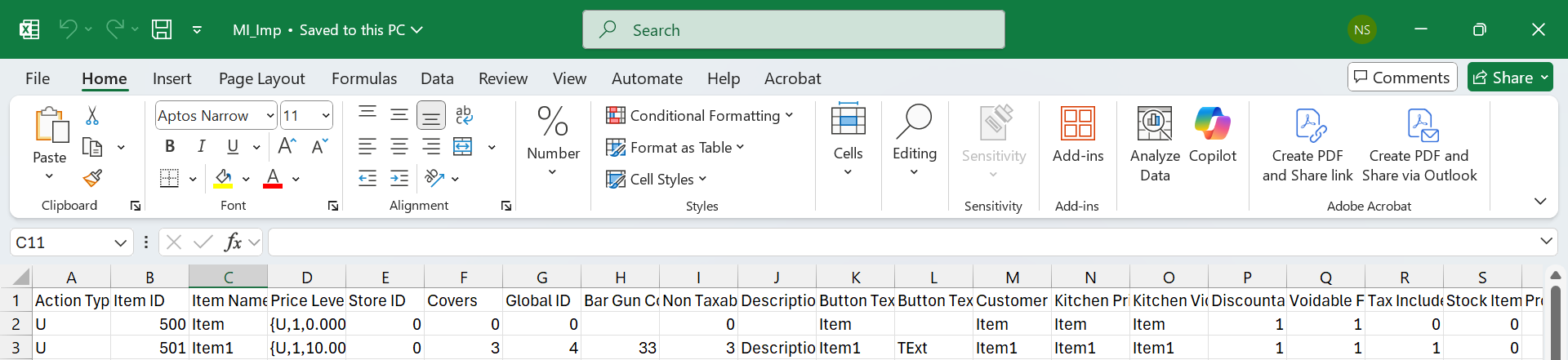
Sample Item Import
Modifier
Modifier Export
The Modifier Export is used to export modifiers from IGCM into a .csv file. The name of the file is Mod_Exp and exported to the following location: <Drive>\InfoGenesis\etenant_id\enterprise_id\Division_id\Store_id.
Parent enterprise users can export base and group modifier records based on the selection in the CCM2 Group drop-down list (Reports ➜ Scheduling ➜ Task Setup ➜ Modifier Export).
The following table provides information on the export specifications:
|
Sequence |
Field Name |
Valid Data |
Format |
Description |
|---|---|---|---|---|
|
1 |
Action |
U |
Text |
U - To add a new modifier or update fields in an existing modifier. If the entered modifier ID already exists, the appropriate modifier record gets updated. If the entered modifier ID does not exist, a new modifier is added. |
|
2 |
Modifier ID |
1-999,999,999 |
Numeric |
The modifier ID. |
|
3 |
Modifier Name |
1-16 |
Text |
The modifier name. |
|
4 |
Price Levels |
0-999,999,999 |
Numeric/Text |
Array indicating the price level in the following format: {action,price level ID,current price} Multiple values can be entered as comma-separated vales. Example: {U,3,10.5},{U,4,50} |
|
5 |
Global ID |
0-99,999 |
Numeric |
Indicates the global ID. |
|
6 |
Store ID |
1-255 |
Numeric |
The store ID. |
|
7 |
Description |
0-1000 |
Text |
The description of the modifier. |
|
8 |
Button Text 1 |
1-7 |
Text |
The button text 1. |
|
9 |
Button Text 2 |
0-7 |
Text |
The button text 2. |
|
10 |
Customer Receipt Text |
1-16 |
Text |
The modifier name to be printed on the receipt. |
|
11 |
Kitchen Printer Text |
0-16 |
Text |
The modifier name to be printed on the kitchen printer. |
|
12 |
Kitchen Video Text |
0-20 |
Text |
The modifier name to be printed on the kitchen video. |
|
13 |
Print Modifier on Customer Check |
0 or 1 |
Numeric |
|
|
14 |
Nested Choice Group ID |
0-99999 |
Numeric |
The nested choice group ID. |
|
15 |
Discount ID |
0-9999 |
Numeric |
The discount ID. |
|
16 |
Item (Product Mix) ID |
0-999,999,999 |
Numeric |
The item (product mix) ID. |
|
17 |
Item Group |
1-9999 |
Numeric |
The item group ID. |
|
18 |
Quantity Category |
0-999 |
Numeric |
The quantity category ID |
|
19 |
Kitchen Department |
0-999 |
Numeric |
The kitchen department ID. |
|
20 |
Cook Time |
Time |
Numeric |
The cook time of the modifier in a department. |
|
21 |
Stage Number |
0-9999 |
Numeric |
The stage number assigned to the department, used in multi station routing. |
|
22 |
Promote as Item |
0 or 1 |
Numeric |
|
|
23 |
Overridden Kitchen Department ID |
0-999 |
Numeric |
The kitchen department ID to be overridden. |
|
24 |
Kitchen Printer (Logical) |
1-255 |
Numeric/Text |
Array indicating kitchen printer in the following format. {action,kitchen printer ID,primary flag} Multiple values can be entered as comma-separated values. Example: {U,1,0},{U,2,1} |
|
25 |
Print with Item on Kitchen Printer |
0 or 1 |
Numeric |
|
|
26 |
Kitchen Video Category ID |
0-999 |
Numeric |
The kitchen video category ID. |
|
27 |
Kitchen Video Department ID |
0-999 |
Numeric |
The kitchen video department ID. |
|
28 |
Cook Time |
Time |
Numeric |
Kitchen cook time. |
|
29 |
Base Calories |
0-999,999 |
Numeric |
Base calories of the modifier. |
|
30 |
Max Calories |
0-999,999 |
Numeric |
Max calories of the modifier. |
|
31 |
Display Name |
0-1000 |
Text |
Modifier display name. |
|
32 |
Allergen |
0-9999 |
Numeric |
Array indicating the allergen in the following format: {action,allergen ID} Multiple values can be entered as comma-separated values. Example: {U,1},{U,4} |
|
33 |
Tags |
1-999 |
Numeric |
Array indicating tags in the following format. {action,tag ID,sequence} Multiple values can be entered as comma-separated values. Example: {U,1,0},{U,2,1} |
|
34 |
Kitchen Special Tags |
0-10 |
Numeric |
Kitchen special tags. |
|
35 |
Hide in POS |
0 or 1 |
Numeric |
|
|
36 |
Read Only in Child Enterprise |
0 or 1 |
Numeric |
|
|
37 |
Exclude for Child Enterprise |
0 or 1 |
Numeric |
|
|
38 |
Translation |
|
Text |
Array indicating translations for the item record in the following format: {“language ISO code”, “modifier name”,“button text 1”,“button text 2”,“kitchen printer text”,“kitchen video text”,“description”,“display name”,“receipt text”} Multiple values can be entered as comma-separated values. Example: {“fr-fr”,“chicken burger”,“chicken”,“burger”,“chburger”,“chburger”, “chburger”,“chicken burger”,“chicken burger”} |
In arrays, double quotes (“ ”) are used only for character (string) values and numeric values are not enclosed with double quotes.
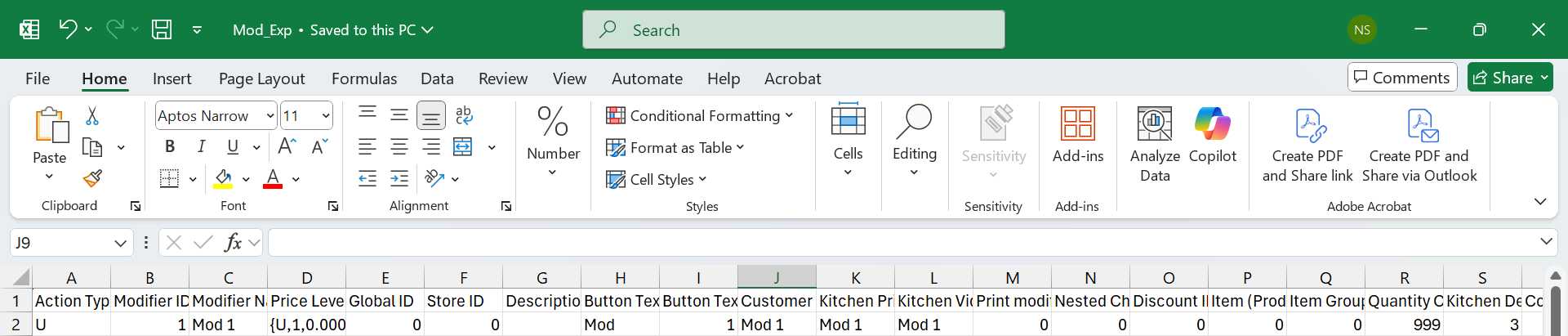
Sample Modifier Export
Modifier Import
The modifier Import is used to import modifier records to the Modifier menu in IGCM using a .csv file. The name of the file is Mod_Imp and placed in the following location: <Drive>\InfoGenesis\itenant_id\enterprise_id\Division_id\Store_id.
Parent enterprise users can import modifier data to base and group records based on the selection in the CCM2 Group drop-down list (Reports ➜ Scheduling ➜ Task Setup ➜ Modifier Import).
It is recommended to first export the .csv file and then perform import by modifying the exported file.
The following table provides information on the import specifications:
|
Sequence |
Field Name |
Valid Data |
Format |
Required |
Description |
|---|---|---|---|---|---|
|
1 |
Action |
U or D |
Text |
Yes |
|
|
2 |
Modifier ID |
1-999,999,999 |
Numeric |
Optional |
The modifier ID. |
|
3 |
Modifier Name |
1-16 |
Text |
Yes |
The modifier name. |
|
4 |
Price Levels |
0-999,999,999 |
Numeric/Text |
Optional |
Array indicating the price level in the following format: {action,price level ID,current price} Multiple values can be entered as comma-separated vales. Example: {U,3,10.5},{U,4,50} |
|
5 |
Global ID |
0-99,999 |
Numeric |
Optional |
Indicates the global ID. |
|
6 |
Store ID |
1-255 |
Numeric |
Optional |
The store ID. |
|
7 |
Description |
0-1000 |
Text |
Optional |
The description of the modifier. |
|
8 |
Button Text 1 |
1-7 |
Text |
Optional |
The button text 1. |
|
9 |
Button Text 2 |
0-7 |
Text |
Optional |
The button text 2. |
|
10 |
Customer Receipt Text |
1-16 |
Text |
Optional |
The modifier name to be printed on the receipt. |
|
11 |
Kitchen Printer Text |
0-16 |
Text |
Optional |
The modifier name to be printed on the kitchen printer. |
|
12 |
Kitchen Video Text |
0-20 |
Text |
Optional |
The modifier name to be printed on the kitchen video. |
|
13 |
Print Modifier on Customer Check |
0 or 1 |
Numeric |
Optional |
|
|
14 |
Nested Choice Group ID |
0-99999 |
Numeric |
Optional |
The nested choice group ID. |
|
15 |
Discount ID |
0-9999 |
Numeric |
Optional |
The discount ID. |
|
16 |
Item (Product Mix) ID |
0-999,999,999 |
Numeric |
Optional |
The item (product mix) ID. |
|
17 |
Item Group |
1-9999 |
Numeric |
Optional |
The item group ID. |
|
18 |
Quantity Category |
0-999 |
Numeric |
Optional |
The quantity category ID |
|
19 |
Kitchen Department |
0-999 |
Numeric |
Optional |
The kitchen department ID. |
|
20 |
Cook Time |
Time |
Numeric |
Optional |
The cook time of the modifier in a department. |
|
21 |
Stage Number |
0-9999 |
Numeric |
Optional |
The stage number assigned to the department, used in multi station routing. |
|
22 |
Promote as Item |
0 or 1 |
Numeric |
Optional |
|
|
23 |
Overridden Kitchen Department ID |
0-999 |
Numeric |
Optional |
The kitchen department ID to be overridden. |
|
24 |
Kitchen Printer (Logical) |
1-255 |
Numeric/Text |
Optional |
Array indicating kitchen printer in the following format. {action,kitchen printer ID,primary flag} Multiple values can be entered as comma-separated values. Example: {U,1,0},{U,2,1} |
|
25 |
Print with Item on Kitchen Printer |
0 or 1 |
Numeric |
Optional |
|
|
26 |
Kitchen Video Category ID |
0-999 |
Numeric |
Optional |
The kitchen video category ID. |
|
27 |
Kitchen Video Department ID |
0-999 |
Numeric |
Optional |
The kitchen video department ID. |
|
28 |
Cook Time |
Time |
Numeric |
Optional |
Kitchen cook time. |
|
29 |
Base Calories |
0-999,999 |
Numeric |
Optional |
Base calories of the modifier. |
|
30 |
Max Calories |
0-999,999 |
Numeric |
Optional |
Max calories of the modifier. |
|
31 |
Display Name |
0-1000 |
Text |
Optional |
Modifier display name. |
|
32 |
Allergen |
0-9999 |
Numeric |
Optional |
Array indicating the allergen in the following format: {action,allergen ID} Multiple values can be entered as comma-separated values. Example: {U,1},{U,4} |
|
33 |
Tags |
1-999 |
Numeric |
Optional |
Array indicating tags in the following format. {action,tag ID,sequence} Multiple values can be entered as comma-separated values. Example: {U,1,0},{U,2,1} |
|
34 |
Kitchen Special Tags |
0-10 |
Numeric |
Optional |
Kitchen special tags. |
|
35 |
Hide in POS |
0 or 1 |
Numeric |
Optional |
|
|
36 |
Read Only in Child Enterprise |
0 or 1 |
Numeric |
Optional |
|
|
37 |
Exclude for Child Enterprise |
0 or 1 |
Numeric |
Optional |
|
|
38 |
Translation |
|
Text |
Optional |
Array indicating translations for the item record in the following format: {“language ISO code”, “modifier name”,“button text 1”,“button text 2”,“kitchen printer text”,“kitchen video text”,“description”,“display name”,“receipt text”} Multiple values can be entered as comma-separated values. Example: {“fr-fr”,“chicken burger”,“chicken”,“burger”,“chburger”,“chburger”, “chburger”,“chicken burger”,“chicken burger”} |
In arrays, double quotes (“ ”) are used only for character (string) values and numeric values are not enclosed with double quotes.
Important Points
-
To update a specific field for the modifier, users can enter the value against the appropriate field in the .csv file and perform an import. The existing values of other fields are retained.
-
The action type, D, must be used within arrays to remove the mapping of those values in an appropriate record. For example, to remove the tag (ID - 5) associated with a modifier record, the value in the Tag field must be modified as {D,5,1}.
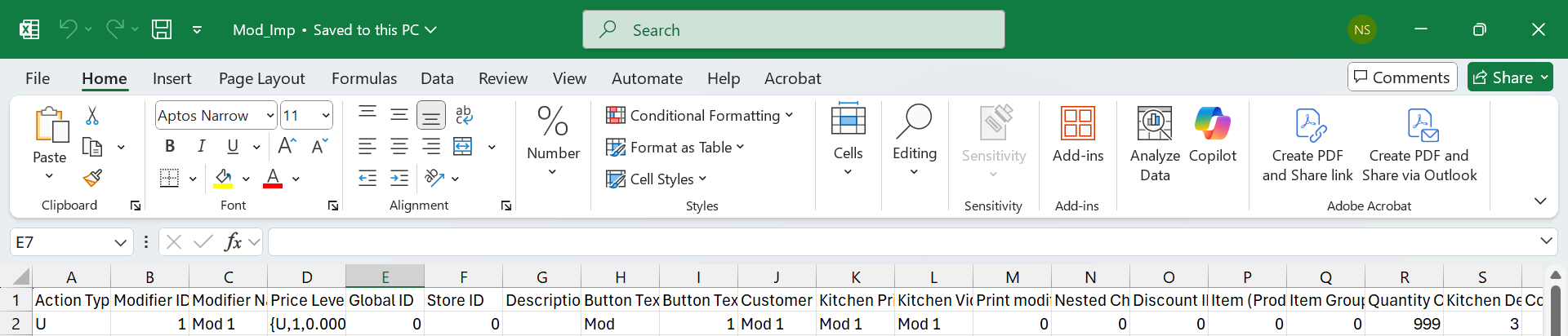
Sample Modifier Import