


Guest Consent for Receiving SMS
Guests can provide consent to receive SMS notifications. After entering their phone number in the Checkout and Order Confirmation screens, guests must explicitly opt in to receive order status and order receipts through SMS.
This functionality is applicable to To Go, Full Service, and Catering profiles only.
Configurations in IGCM
Navigate to Kiosk/OnDemand Configuration ➜ Administration ➜ Site Entities.
Choose the appropriate record and select Edit.
Navigate to the Compliance Configurations section in the Additional Settings submenu.
Refer to the following table and fill in the fields:
|
Field |
Description |
|---|---|
|
Show Mandatory Compliance Text in Order Status |
Enable this checkbox to allow guests to provide their consent to receive order status through SMS. |
|
Compliance Text |
Enter the text to be displayed below the Phone Number field in Checkout screen. Default - By sharing your number, you agree to receive SMS messages. Message & data rates may apply. |
|
Show Mandatory Compliance Text in Receipt |
Enable this checkbox to allow guests to provide their consent to receive order receipt through SMS. |
|
Compliance Text |
Enter the text to be displayed below the Phone Number field in the Order Confirmation screen. Default - By sharing your number, you agree to receive SMS messages. Message & data rates may apply. |
Select Save.
Implementation in OnDemand
Launch IG OnDemand.
Add preferred items to the check and navigate to the Checkout screen.
Enter the phone number in the Phone Number field and enable the checkbox displayed with the configured compliance text to receive the order status through SMS. This consent is mandatory to navigate to the next screen if guests decide to provide the phone number.
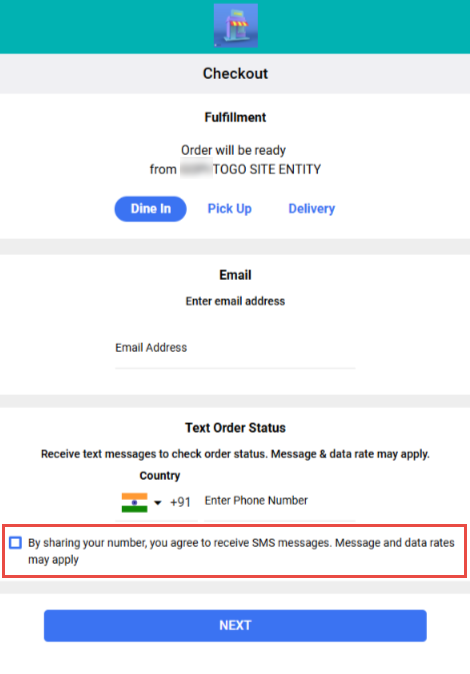
Select Next and navigate to the Payment screen.
Complete the payment. The Order Confirmation screen is displayed.
Select the Text Receipt in the Additional Options section.
Enter the phone number in the Phone Number field and enable the checkbox displayed with the configured compliance text to receive the order receipt through SMS.
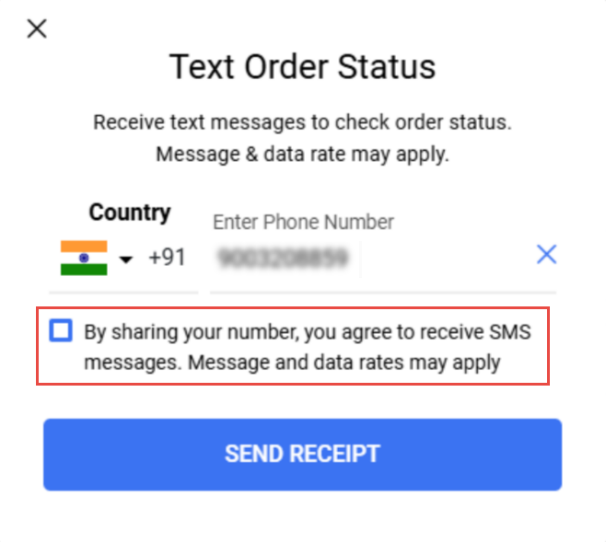
Select Send Receipt.