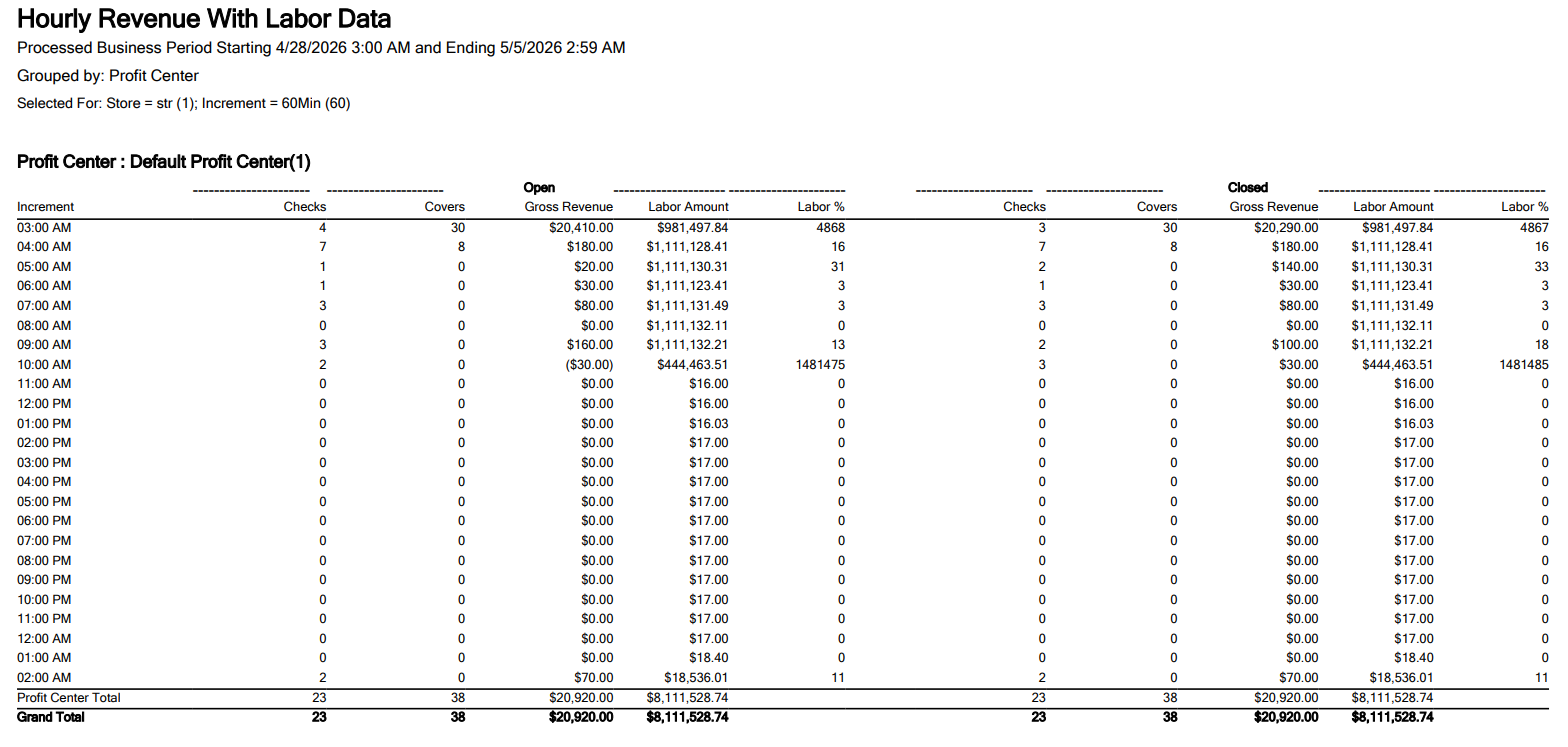
Hourly Revenue with Labor Data
Hourly revenue with labor data report shows combined sales and labor data for selected time in a single report.
Important Points
-
Labor data is displayed only when employee clock-in data is available.
-
The latest labour rate is updated in the report only when the employee clocks out and clocks in.
-
Clock-in is calculated based on the profit center.
-
If an employee performs transactions in a different profit center without clocking in, the labor rate for that profit center is not considered.
-
Labor data is calculated cumulatively across multiple terminals when an employee is clocked in on different terminals, based on the labor rate of the assigned profit center.
-
If the terminal is offline and data is not synced, the report is generated only with the data available in the server.
-
For a fixed period, the report can be generated only for a maximum of 7 days.
-
The report is supported when the terminal is connected to LAS and GAS. It is recommended that certain terminals not be connected to the server through LAS.
-
If the selected date range exceeds the allowed limit of 7 days for a fixed period selection, the message, Date range exceeds allowed period will be displayed.
-
If an invalid filter option is selected, the message, Invalid filter selection will be displayed.
Report Details
This report includes the following fields:
|
Field |
Description |
|---|---|
|
Processed Business Period Starting and Ending |
Displays the start and end date and time of the business period for which the report is generated. |
|
Grouped by |
Displays the selected grouping for the report. |
|
Selected for |
Displays the selected store and increment interval. |
|
Profit Center |
Displays the profit center name. |
|
Open |
|
|
Increment |
Displays the selected time interval. |
|
Checks |
Displays the number of checks recorded within the time interval. |
|
Covers |
Displays the number of covers associated with the checks within the time interval. |
|
Gross Revenue |
Displays the total gross revenue generated within the time interval. |
|
Labor Amount |
Displays the total labor cost associated with the time interval. Labor Amount = Sum of individual labor rates of clocked in employees. |
|
Labor% |
Displays the percentage of labor cost against the gross revenue for the time interval. Labor % = [LaborRate * 100 / Gross Revenue]. |
|
Closed |
|
|
Checks |
Displays the number of closed checks within the time interval. |
|
Covers |
Displays the total covers associated with closed checks within the time interval. |
|
Gross Revenue |
Displays the total gross revenue from closed checks within the time interval. |
|
Labor Amount |
Displays the labor cost associated with the time interval for closed data. |
|
Labor% |
Displays the labor percentage calculated against gross revenue for closed data. |