


Release 12.3.14
12.3.14.4 (12.x Server Only)
Display Configured Account Name in Inquiry Screen for Atrium Campus Cards
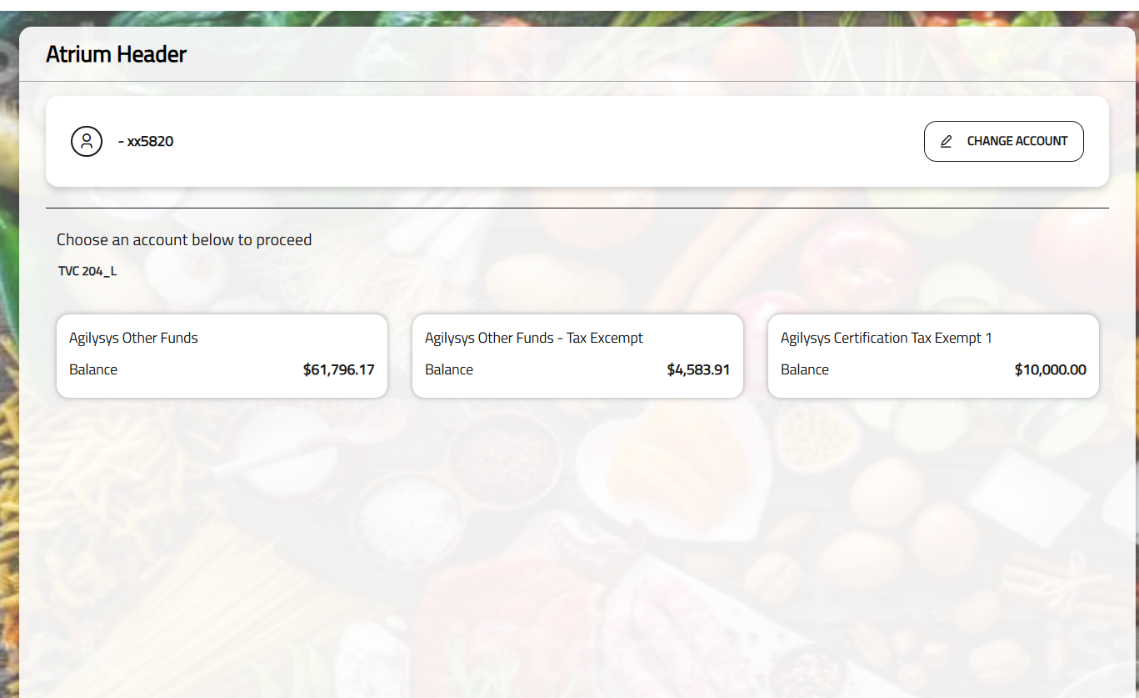
IG Kiosk has been enhanced to display all the accounts associated with the guest at the kiosk by the names configured in the Atrium Campus Card system.
Previously, irrespective of the customization in the Atrium system, multiple accounts associated with a guest were listed in a generic numeric sequence such as Account 1, Account 2, and so on during inquiry.
This is only applicable to the inquiry screen displayed through Tender screen upon selecting a tender configured with one of the following tender verification codes:
-
Tender Verification Code 200 (Campus Card System - Meal Count)
-
Tender Verification Code 201 (Campus Card System - Guest Meal Count)
-
Tender Verification Code 204 (Campus Card System - Other Funds)
-
Tender Verification Code 206 (Campus Card System - Cash Equivalency)
Changes made in IGCM
To support this, a new terminal option, Terminal Option 1510 (Display the Account Name Configured in the Campus Card system), has been introduced.
-
When enabled, the account names are displayed as configured in the Atrium system.
-
When disabled, the account names are displayed in a generic sequence. By default, this terminal option is disabled.