


Display Course Timers on Expo Chit
An individual timer can be displayed for each course to track their preparation time. Along with the chit-level timer, each course is displayed with its own timer which may differ depending on the bumping sequence.
Sample Screen
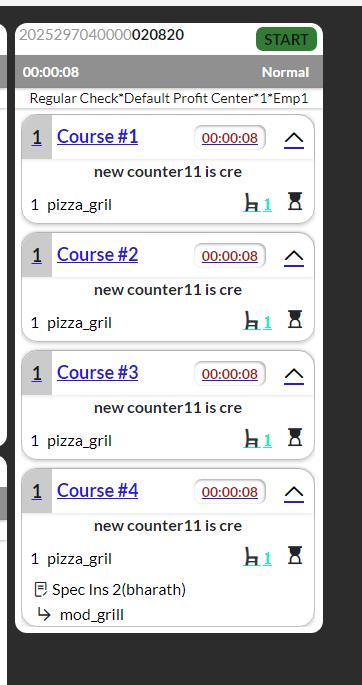
Refer to the following table for the behaviour:
|
Scenario |
Expected Behaviour |
|---|---|
|
Any item in a course is fired |
The course timer starts immediately. |
|
Course is on hold |
The course timer remains at 00:00:00 until the course is fired. |
|
Single or multi-station routing |
The course timer starts if any item in the course is fired, irrespective of routing. |
|
Course is not fully bumped |
The course timer is displayed on the course header and the expanded chit. |
|
All items in a course are bumped |
The course timer is stopped. |
|
New item added after bump |
The course timer restarts from 00:00:00 and the course reappears in Open orders tab. |
|
Course reopened |
The course timer resumes and is displayed until all items in the course are bumped. |
|
Entire chit is reopened |
The course timer resumes from the previously elapsed time. |
|
All items under a course are voided |
The course timer is stopped. |
|
A new item is added to a fired course |
The course timer remains active. |
|
Hold items are fired later |
The course timer restarts when the hold items are fired, reflecting the latest course activity. |