


Long Wait Alert in Expo Chit
IG KDS has been enhanced to change the color of the chit in the expo to indicate that an order is in progress for a long duration. Users can configure the preferred color and duration after which the color must be changed. This setting takes precedence over all other chit color configurations. This feature is supported for only open and closed tabs in both prep and master expos.
Changes Made in IGCM
A new checkbox, Late order color, has been added to the Orders submenu under POS Configuration ➜ Kitchen ➜ Display System.
A new submenu, Later Order Color Control, has been added to POS Configuration ➜ Kitchen ➜ Display System.
Configurations in IGCM
Navigate to POS Configuration ➜ Kitchen ➜ Display System.
Select the preferred record to edit.
Under the Orders submenu, enable the Late order color checkbox. The Later Order Color Control submenu is displayed only when this checkbox is enabled.
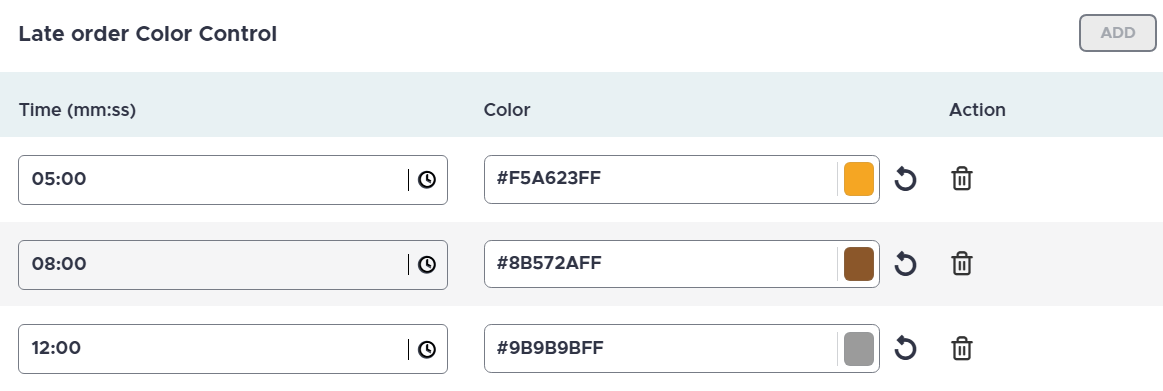
Select ADD.
Refer to the following table and fill in the fields:
|
Field |
Description |
|---|---|
|
Time (mm:ss) |
Enter the time in mm:ss after which the color of the chit must change to the color configured. |
|
Color |
Choose the preferred color from the color picker or enter the hex code. |
A maximum of three records can be configured.