


Group Items by Modifiers in Item Summary
IG KDS has been enhanced to allow users to group items in Item Summary based on the mapped modifiers. Previously, the items were grouped based on their configured labels. With this enhancement, items with multiple modifiers are grouped under the item in Item Summary, with counts displayed at both item and modifier level. When an item is bumped, the count is reduced from both the item and modifier summary.
For example,
Consider the following order:
-
Item: Lamb Chops
-
Modifier: Medium Rare, Feta - 2
-
Modifier: Well Done - 2
These are grouped under Lamb Chops in the Item Summary, with the total count (5) and individual counts displayed for each modifier.
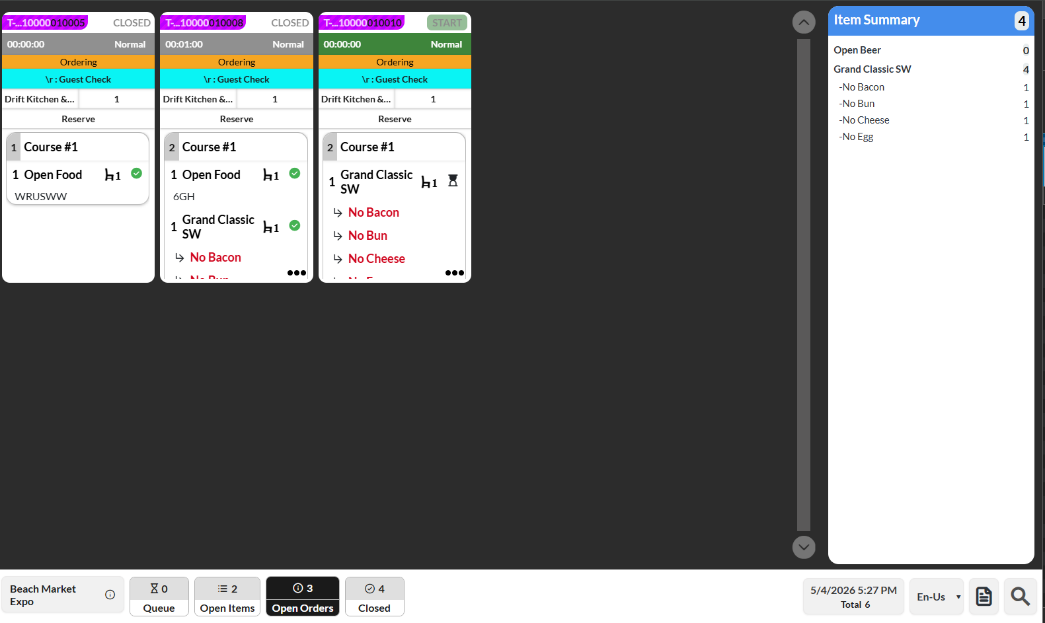
Order Source: InfoGenesis POS Terminal 12UX, IG Kiosk, IG OnDemand, and IG Fly.
Important Points
-
This feature is supported for both prep and master expo.
-
Special instructions are not supported.
-
Users can configure either the label‑based summary or the advanced item summary.
-
Items configured in IGCM remain visible in the item summary even if their quantity is zero.
-
Modifiers routed to another station are not displayed in the item summary, and items with only routed modifiers are shown with a count of 0. The count is updated only when the item and modifier match the IGCM configuration.
-
When an item is routed to multiple stations, it is included in the item summary of each station where the item is visible.
-
The following error messages are displayed when the user attempts to save without selecting an item or modifier:
-
Item - Please select one item.
-
Modifier - Please select one or more modifiers.
-
-
Nested modifiers are displayed after the modifier in the item summary.
-
Hold and void items are not displayed in the item summary.
-
The item and modifiers are displayed in the advanced item summary irrespective of the payment status when the payment status based Start button feature is enabled.
-
Item counts are updated in the item summary only after the order is accepted in the expo.
-
Both classic and modern layouts are supported.
-
Bump bar functionality is not supported.
Changes Made in IGCM
To support this, a new checkbox, Advanced Item Summary, has been added to the Summary Table submenu in the Display Settings menu (POS Configuration ➜ Kitchen ➜ Display Settings).
-
When enabled, the item summary groups items by selected modifiers.
-
When disabled, the item summary groups items by configured labels. This checkbox is disabled by default.
The label configuration will not be displayed when this checkbox is enabled.
Configurations in IGCM
Navigate to POS Configuration ➜ Kitchen ➜ Display Settings.
Select the preferred record from the screen and select Edit to modify it.
Navigate to the Summary Table submenu.
Enable the Advanced Item Summary checkbox.
Refer to the following table and fill in the fields:
|
Field |
Description |
|---|---|
|
Sequence |
Drag and drop rows or use arrow controls to configure display order. |
|
Items |
Select the preferred item from the drop-down list. |
|
Modifiers |
Select the preferred modifiers from the drop-down list. |
|
Action |
Select the Delete icon to remove the configured row. |
Select Save.