


12.3.15
Display Station Names for Multiple OSDs
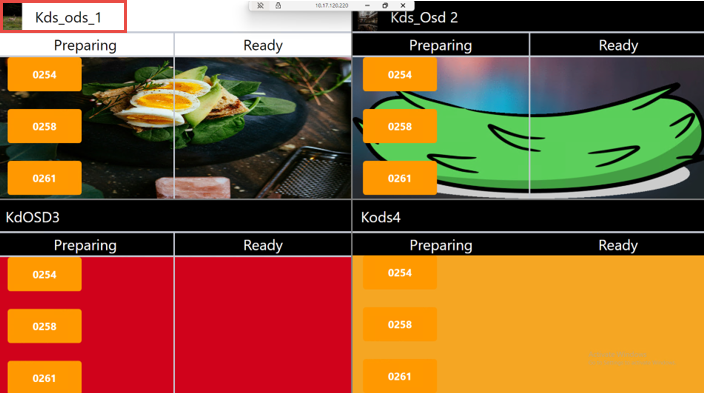
IG KDS has been enhanced to display the station name and logo at the top of each OSD when multiple OSDs are displayed using the split-screen method. Previously, station names and logo were not displayed when multiple OSDs were displayed on a single screen, making it difficult for the user to identify each station.
Sample Screen
Important Points
-
This feature is not supported for single OSD.
-
Rotational OSD is not supported.
-
It is supported only when Prepared and Ready order statuses are selected and organized as Separated in Columns in the Logo and Header section under the OSD submenu in the Display System menu (POS Configuration ➜ Kitchen ➜ Display System).
Changes Made in IGCM
To support this, a new checkbox, Show Station Name and Logo, has been added to the Multiple OSD Settings submenu under the Kitchen Profile menu (POS Configuration ➜ Kitchen ➜ Kitchen Profile).
-
When enabled, the station name and logo are displayed on each OSD when the split option is used.
-
When disabled, station names and logos are not displayed. This checkbox is disabled by default.
Configurations in IGCM
Navigate to POS Configuration ➜ Kitchen ➜ Kitchen Profile.
Select the preferred record from the screen and select Edit to modify it.
Navigate to the Multiple OSD Settings submenu.
Enable the Show Station Name and Logo checkbox.
Select Save.