


Price Change Utility vs Scheduled Price Change Menu
The Schedule Price Change menu allows users to schedule a price change for a future date. A schedule can be created for a date range, and the item price will change based on the schedule. This functionality can be used when a property wants to sell a certain item at a different price during a period. For example: If the base price of coffee is $10 during the week but must be changed to $5 during the weekend, a schedule can be created to change the price of coffee to $5. The price is reset to $10 after the weekend.
IGCM: Utilities ➜ Items ➜ Schedule Price Change
Universal Desktop: Items ➜ Schedule Price Change
The Price Change Utility on the other hand, allows the user to change the price of an item only when the utility is run. The item’s price is not reset as in the case of scheduled pricing. Users must run the utility again to change the price of the item.
Universal Desktop: Utilities ➜ Price Change Utility
For more information refer to the Schedule Price Change section under Items, in the Agilysys InfoGenesis POS 4.5.3 Configuration Guide.
For customers using 12.x server, refer to the Schedule Price Change menu under Utilities ➜ Items, in the InfoGenesis Configuration Manager for POS Terminal document.
For more information, refer to the Price Change Utility section below Configuration Utilities in the InfoGenesis POS Interfaces and Utilities document.
Price Change Utility is only supported with 4.5.3 server.
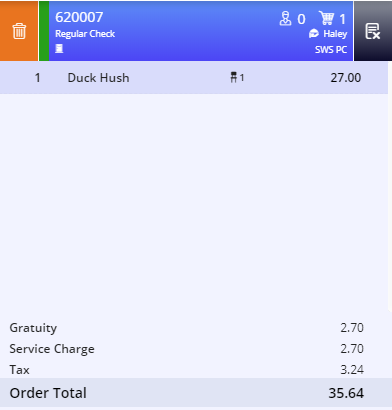
The POS Terminal shows the price of the items as configured in IGCM or Universal Desktop. Based on the scheduled price changes, the POS Terminal displays the item price. In this case, the price of the item, Duck Hush is scheduled as $27.00 (previously $25.00). During the scheduled period POS terminal shows the new price and after the schedule ends, POS terminal reverts to the old price ($25.00).
If an item has a schedule created as well as Store Price level configured, then Store price level takes precedence, and the POS terminal displays that amount even if the schedule has not ended. For example, If Apple has Scheduled Price as $10.00 but the Store Price level configured is $12.00, the POS terminal displays the price of Apple as $12.00.