


Open Checks Purge
The POS terminal allows users to permanently delete unwanted open checks after a retention period of 30 days.
This function is used to select open checks for deletion. Once marked, the open checks are purged after a period of 30 days from when they are selected for deletion.
Perform the following steps to select open checks to be deleted:
Log on to the POS terminal.
Navigate to Jump Bar ➜ Functions ➜ Open Checks Purge (#2090). The Open Checks Purge screen appears. Two tabs, Purge, and Recover, are displayed. The Purge tab displays the list of open checks available in the terminal.
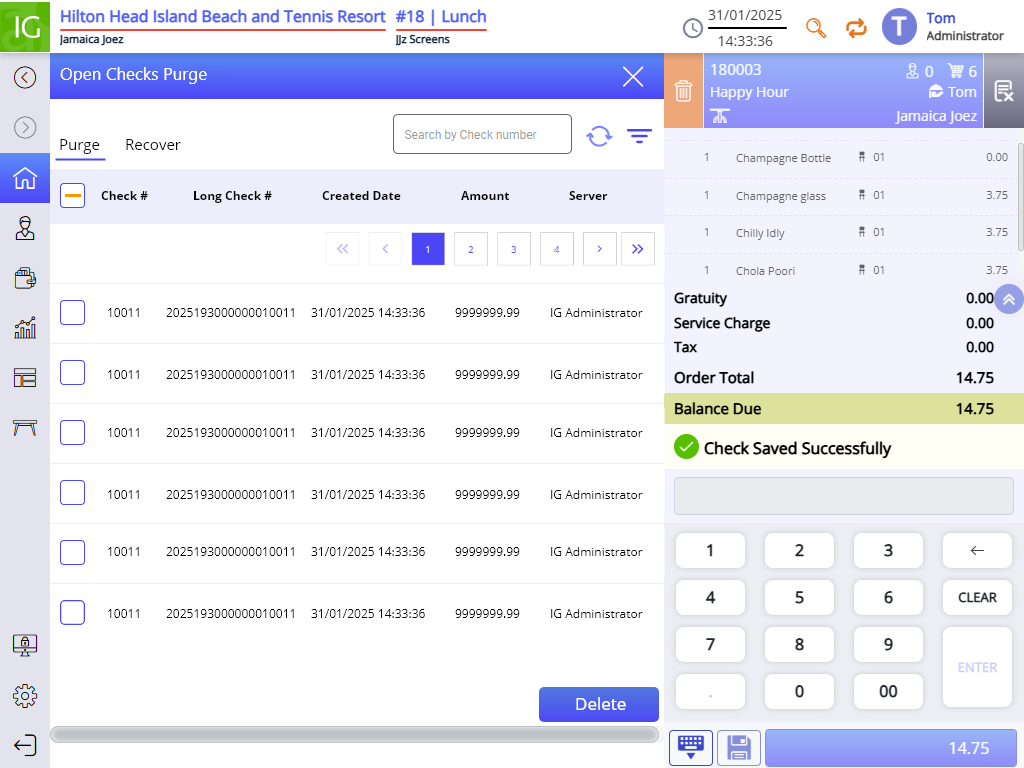
Select the checks and select Delete. The checks once deleted are moved to the Recover tab. Users can recover any check from this tab if needed within the retention window.
Important Points
-
If an item is added to the check, the item count is depleted and the Quantity on Hand is displayed on item button according. If the check is kept open and later deleted, the item quantity displayed in the counter in the item button is not reversed.
-
Master checks cannot be deleted even if they are kept open.
-
Apart from open checks, partially tendered, Pay at Table, and authorized checks can be deleted as well. In this case, a message, The checks selected may include partially tendered, pay at table, authorization checks. These checks cannot be viewed or recalled and will be permanently deleted after 30 days. Please confirm if you still want to proceed with this action, appears.
-
Purging the open checks does not void the kitchen printer chits in expo.
-
Open checks that are created with the terminal in training mode can also be purged using the Open Checks Purge (#2090) function, and the terminal does not have to be in training mode to do this.
-
When performing the Open Checks Purge (#2090) function on Pay at Table saved checks, the void function cannot be initiated.