


Implementation at the POS Terminal
Item Display System
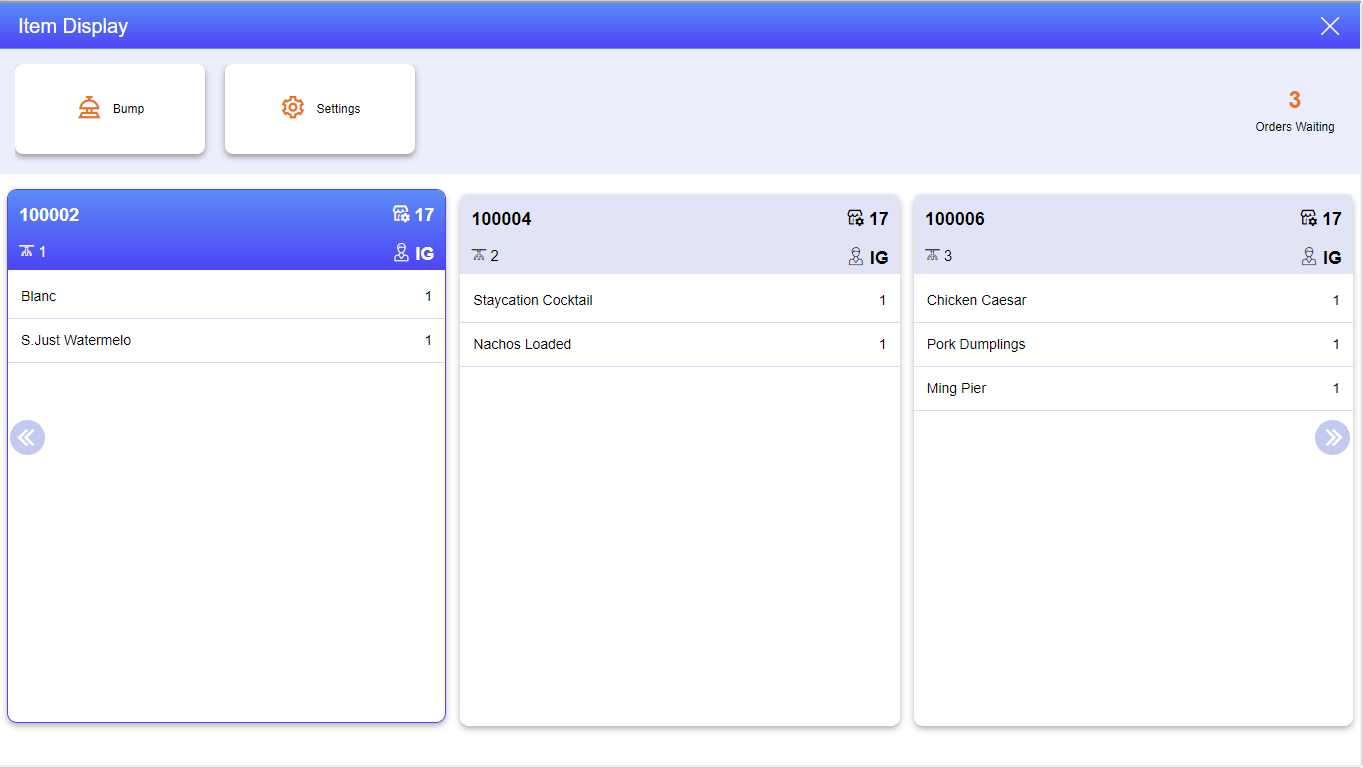
The Item Display System (#390) function displays the open checks available for processing at the IDS. Only three are displayed at any one time.
To use the Item Display mode, perform the following steps at the ordering POS Terminal.
Open a check and add the preferred items.
Save the check.
To view the order, perform the following steps at the IDS POS Terminal.
Navigate to Functions ➜ Item Display System.
The Item Display Mode appears. The screen displays the check saved at the ordering POS Terminal.
|
Icon |
Description |
|---|---|
|
|
Bump Order Select the bump option to clear the orders off the display. |
|
|
Settings Select the Settings icon to modify the number of checks to be displayed on the screen. |
|
|
Orders Waiting Displays the number of orders waiting on the IDS. |


After processing the order,
Select the check. As in this case, check #100002.
Select the Bump option available on the screen to bump off the check from the orders waiting.
The check is bumped off.
Bumping Orders
As bar gun drinks are poured, the poured count of the associated item is incremented until the full quantity of the item is poured. At this point, when the item is fully poured, the item text changes to red, indicating that the item is fully poured. An item display system order is able to include non-bar gun code items. Such items appear in black text. Bottled beer is a common example of a non-bar-gun item. Such items are not poured from the bar gun, yet they are still handled in the item display system.
Item display system item type/status is indicated by the color codes:
|
Text color |
Status |
|---|---|
|
Green |
Bar gun item (not fully yet fully poured). |
|
Red |
Bar gun item (fully poured). |
|
Black |
Not a bar gun code item (e.g., a bottled beer) |
If the Only allow bump after all bar gun items are poured check box is selected, an item order cannot be bumped off until the order is complete and all bar gun drink items on the order are fully poured. In other words, an item order including any “green text color” items (undispensed drinks) cannot be bumped off. The order is not completed until all such items are red, indicating they are fully poured. The bartender can shift between item orders (using the Prev and Next functions) to pour drinks from different orders without completing the current active order. A drink order cannot be bumped until it is complete.
When a completed drink order is bumped off (by touching the Bump button or sending bar gun code 65501), the order is deleted from the Item List data file and an Item Display Receipt is printed (if the Print item display receipt when order is bumped check box is selected). The drink order chit helps the bartender organize the workflow for pouring drinks and placing them on a tray (real or conceptual) for delivery to the guests. The Item Display Receipt includes the following information:
-
Profit Center
-
Server name
-
Check number
-
Date and time
List of all items/modifiers/special instructions.