


Tip Transfer Detail Report
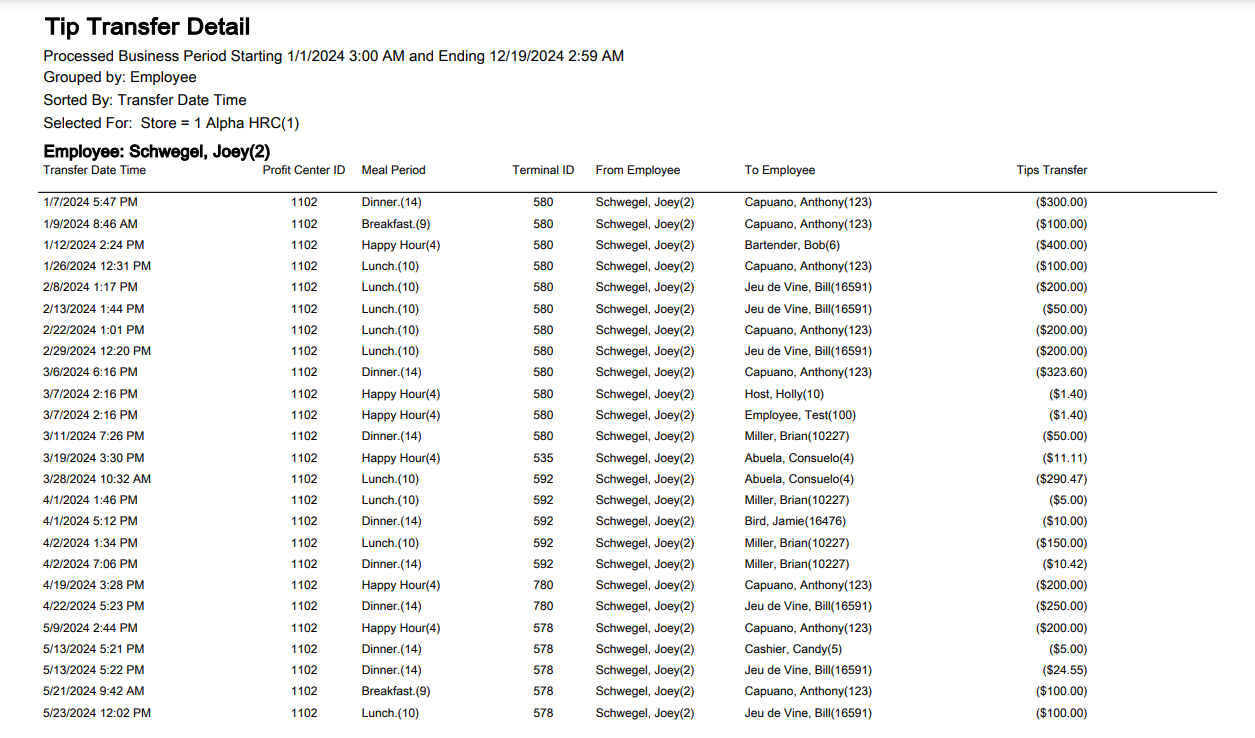
The Tip Transfer Detail Report provides the ability to see each tip transfer for a specific employee to match the employee’s tip transfer slip. This report also shows any other tip transfers to and from a specific employee to verify the total due to them. Only tip transfers done after an upgrade to InfoGenesis POS version 4.4.4 or higher appear on the report.
The Employee Total on this report reconciles with the Tips Transfer column on the IRS Tips Report when the reports are run for the same processed business period range. The tips earned by each employee are listed on the IRS Tips Report as well.
The Tip Transfer Detail Report reconciles with these terminal reports:
-
Employee Tip Transfer Terminal Report - 191
-
Historical Employee Tips Terminal Report - 190
Tip Transfer Detail Report
|
Grouping Levels |
Sorting Choices |
Filters |
|---|---|---|
|
Employee* |
From Employee |
Employee |
|
* = default setting |
Meal Period |
Meal Period |
|
Profit Center ID |
Profit Center |
|
|
Terminal ID |
Profit Center Group |
|
|
Tips Transfer |
Store |
|
|
To Employee |
Terminal |
|
|
Transfer Date Time * |
Fields:
|
Field |
Description |
|---|---|
|
Transfer Date Time |
The date and time of the tip transfer. |
|
Profit Center ID |
The profit center ID. |
|
Meal Period |
The meal period that the tip transfer took place during. |
|
Terminal ID |
The terminal ID where the transfer was performed. |
|
From Employee |
The employee who transfers their tips to another employee. |
|
To Employee |
The employee who receives the tips. |
|
Tips Transfer |
The amount transferred. |
|
Grats Transfer |
The amount transferred for gratuity. |
|
Total = Tips Transfer + Grats Transfer |
The total amount of tips and gratuity transferred. |
The tendered business period range may have discrepancies due to an issue in the IRS Tips Report.