


Server Shift Sales Tips and Gratuities Report
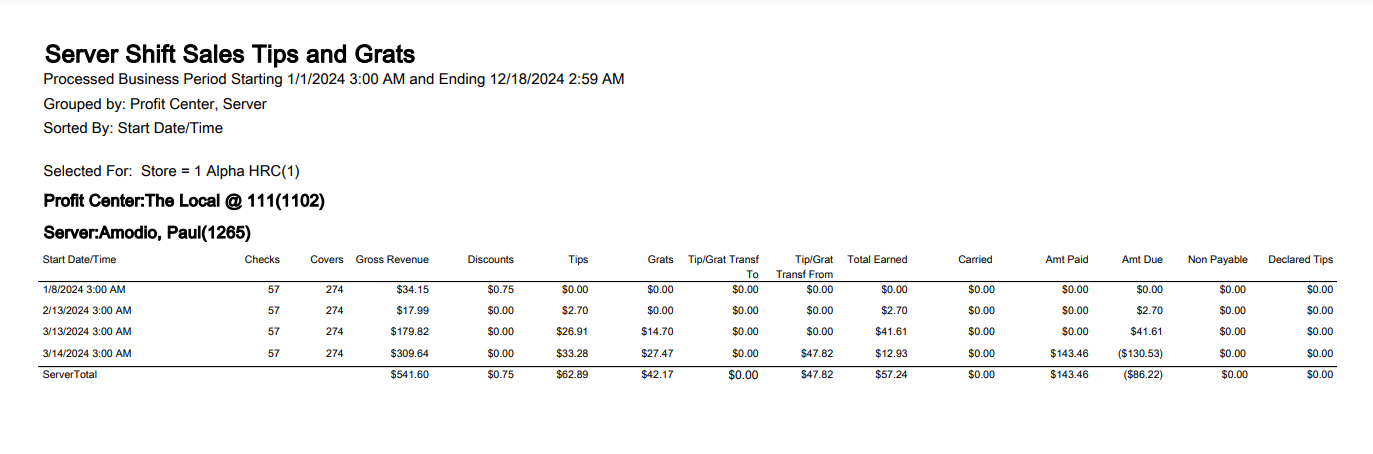
The Server Shift Sales, Tips, and Gratuities Report provides a view of the sales, tips, gratuities, etc. for a server for each shift that has been reset during the selected business period range. Depending on how this report is grouped, data is summarized by the business period or by each shift in a business period. This report is based on data accumulated during the server's shift. A shift reset is required for data to appear on this report. This report is designed for managers who want to determine the amount of tips owed to the server.
Shift is available as a grouping level. This differs from other grouping options since it is only available as the lowest level of grouping and it displays at a level lower than Business Period. If Shift is not selected as a grouping level, the detailed area of the report is summarized by Business Period. Business Period is a hard-coded grouping level.
|
Field |
Description |
|---|---|
|
Amt Due |
Amt Due = Tips +Grats + Tips Transf – Amt Paid + Carried |
|
Amt Paid |
Amt Paid = Tips Paid + Grats Paid |
|
Carried |
Carried = Tips Carried + Grats Carried |
|
Gross Revenue |
Gross Revenue = Gross Sales |
|
Total Earned |
Total Earned = Tips + Grats + Tip/Grat Transf To – Tip/Grat Transf From |
Server Sales Tips and Gratuities Report
|
Grouping Levels (2 possible) |
Sorting Choices |
Filters |
|
|---|---|---|---|
|
Profit Center * |
Start Date/Time * |
Profit Center |
Amount Due |
|
Server (2) |
Amt Due |
Profit Center Group |
Amount Paid |
|
Profit Center Group |
Amt Paid |
Server |
Carried |
|
Shift (lowest grouping level only) |
Carried |
Server Group |
Checks |
|
* = default setting |
Checks |
Store |
Covers |
|
Covers |
Declared Tips |
||
|
Declared Tips |
Discounts |
||
|
Discounts |
Grats |
||
|
Grats |
Gross Revenue |
||
|
Gross Revenue |
Non-Payable |
||
|
Non Payable |
Tip/Grat Transf From |
||
|
Tip/Grat Transf From |
Tip/Grat Transf To |
||
|
Tip/Grat Transf To |
Tips |
||
|
Tips |
Total Earned |
||
|
Total Earned |