


Server Sales by Items Added Report
The Server Sales by Items Added Report tracks revenue based on the user who added the item to the check rather than accounting all the revenue to the owner of the check irrespective of the different users who added the items to the check. It reports on closed transactions and includes item level discounts. Check level discounts are not included. Item level discounts will be associated with the server who added the item to the check.
This report includes the following fields:
|
Field |
Description |
|---|---|
|
Server ID |
The employee ID of the server. |
|
Server Name |
The name of the server. |
|
Net Revenue |
Gross revenue minus discounts and taxes. |
|
Discount |
The dollar amount of all discounts listed on the check. |
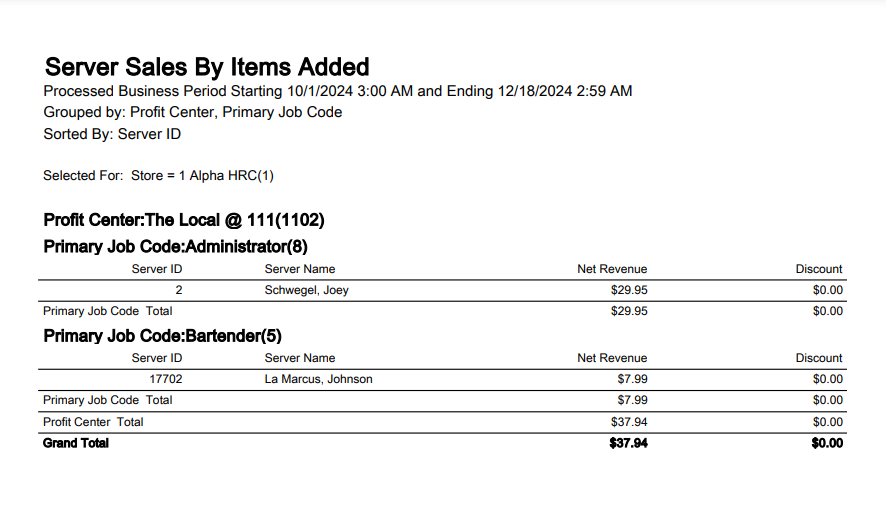
The report supports a variety of sorting, grouping, and filtering options.
Server Sales by Items Added Report
|
Grouping Levels (3 possible) |
Sorting Choices |
Filters |
|---|---|---|
|
Profit Center * |
Server ID * |
Business Period (on Date Ranges tab) |
|
Profit Center Group |
Server Name |
Store * |
|
Primary Job Code * |
Discount |
Profit Center |
|
* = default setting |
Net Revenue |
Profit Center Group |
|
Discount |
Meal Period |
|
|
|
Check Type |
|
|
|
Server |
Rules for Revenue Calculation in the Report
The following rules are considered for revenue calculation in the report.
-
Revenue contributed by each item in the check is accounted to the employee who added that item to the check.
-
Item level discounts are accounted to the server who added that item to the check.
-
The revenue from reordered list or item is accounted to the employee who reordered that list or item to the check. For example, if server Adam opens check #10001 and adds Pizza ($30) and a Coke ($5) and then server Ben recalls the check and reorders a Pizza ($30) and a Coke ($5) then the revenue for Adam increases by $35 and revenue for Ben increases by $35 in the report.
-
Tip amount, service charge, and gratuity are not included in the report.
-
Check level discounts are not included in the report. For example, Server (Adam) opens a check #10001, adds item (Pizza) - $10, adds a check level discount of $2, and tenders the check. The net revenue for Adam increases by $8 in the report, while the discount of $2 is not accounted in the report.
|
Scenario |
Example |
Revenue calculation in report |
|---|---|---|
|
Simple Check |
Server (Adam) opens check #10001 and adds item (Pizza) - $30 and tenders the check. |
The revenue for Adam increases by $30 in the report. |
|
Split Check |
Server (Ben) creates check #10001 and adds items (Pizza) - $30 and (Coke) - $5. When this check is split, two checks are created with Ben has the owner. |
All the revenue is added to Ben as he added the items to the check. |
|
Combine Checks |
Server (Adam) creates check #10001 and adds item (Pizza) - $30. Server (Ben) creates check #10002 and adds item (Coke) - $5. When these two checks are combined, the resultant check owner is Ben. |
The revenue for Adam increases by $30 and revenue for Ben increases by $5. |
|
Check Modified by employee with higher job code |
Server (Adam) creates check #10001 and adds item (Pizza) - $30. Manager (Chris) recalls the check and adds item (Coke) - $5. |
The revenue for Adam increases by $30 and revenue for Chris increases by $5 in the report. |
|
Team Serving - check handled by team |
Adam and Ben are part of a team and Team Serving function is enabled in the terminal. Adam opens check #10001 and adds item (Pizza) - $30. Ben adds item (Coke) - $5. |
The revenue for Adam increases by $30 and revenue for Ben increases by $5 in the report. |
|
Team Serving - check transfer from team to a server |
Adam and Ben are part of a team and Team Serving function is enabled in the terminal. Adam opens check #10001 and adds item (Pizza) - $30. The check is transferred to Chris who is not a part of the team. |
The revenue for the items that are added by each user is accounted to that user. |
|
Item Voided by Another User |
Server (Adam) creates check #10001 and adds item (Pizza) - $30. Manager (Chris) recalls the check and adds item (Coke) - $5 and voids item (Pizza) - $30. |
The revenue for Chris increases by $5 in the report and revenue for Adam decreases by $30 as the item added by him was voided. |
|
Transfer Server |
Server (Adam) opens check #10001 and adds item (Pizza) - $30. Transfers the check to Server (Ben) using the Transfer Server function. Ben adds item (Coke) - $5. |
The revenue for Adam increases by $30 and revenue for Ben increases by $5 in the report. |
|
Reorder List or Item |
Server (Adam) opens check #10001 and adds items (Pizza) - $30 and (Coke) - $5. Server (Ben) recalls the check and reorders the items (Pizza) - $30 and (Coke) - $5. |
The revenue for Adam increases by $35 and revenue for Ben increases by $35 in the report. |