


IRS Tips Report
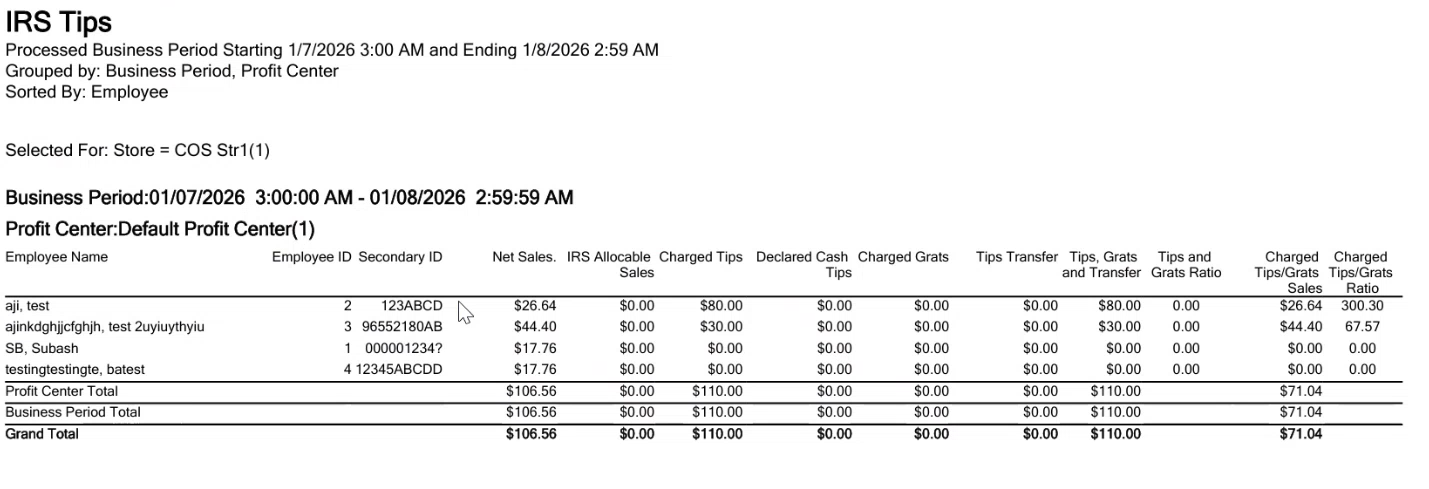
The IRS Tips Report provides tips information recorded in the POS system for mid-level managers looking at tip payouts.
Declared Cash Tips data is only available after a shift reset has been performed.
Comparing IRS Tip Reports to Other Reports
The net sales of the IRS Tip Report match the Server Shift Tip and Gratuity sales when the shifts are reset at the time the report is run. The IRS Tip Report net totals also match the Gross Sales by Tender Report totals.
IRS Tip Report Columns
-
IRS Allocable Sales - IRS Allocable Sales reflect all sales where the Include in IRS Reporting option is selected for the check type, revenue category, and tender. If any one of these three options is not selected the item and its total do not appear correctly in this column.
-
Charged Tips/Grats Sales - This column is the amount of the total check less tax (which also includes adjusted tax-inclusive items) for sales tendered via credit or debit card. The column contains the total of all sales on which a tip is added to the check. It excludes all sales where the customer left a cash tip that did not get recorded into the POS system. In addition, cash transactions that have an automatic tip added to the check (large parties, room service, etc.) can be included. For example, an item of $5.00 plus tax appears in the column as $5.00. If the item is $5.00 and tax-inclusive the amount is less than the percentage of the tax in the city/state. It also includes only checks that have had a tip or gratuity added to the check.
|
Field |
Description |
|---|---|
|
Employee ID |
The primary ID of the employee. |
|
Secondary ID |
The Secondary ID configured under the Employee menu in the IGCM. If an employee does not have a Secondary ID configured in the Employee menu, the Secondary ID field will appear blank in the reports. |
|
Tips, Grats and Transfer |
Tips, Grats and Transfer = Charged Tips + Declared Cash Tips + Gratuities + Tips Transferred In – Tips Transferred Out |
|
Tips and Grats |
Tips and Grats = (Tips, Grats, and Transfer) ¸ IRS Allocable Sales |
|
IRS Tips/Grats Ratio |
Lists the percentage of the tip/grat to the total allocable sales. For example, The tip ratio for a $5.00 check with a $10.00 tip is 200%. The column lets the operator view the percent ratio the servers are tipped based on their sales. |
|
Tips Transfer |
Tips Transfer = Tips Transferred In – Tips Transferred Out |
|
Grats Transfer |
The gratuity amount transferred from the employee’s bucket. |
|
Tip/Grats Ratio |
Tip/Grats Ratio = (Tips, Grats, and Transfer) ¸ IRS Allocable Sales |
|
Charged Tips/Grats Sales |
Charged Tips/Grats Sales = Charged Tip Sales Amt – Charged Tip Discount Amt This column lists the same information as the Tips and Grats column, calculated against the Charged Tips/Grat Sales. |
|
Charged Tips/Grats Ratio |
Charged Tips/Grats Ratio = Charged Tips/Grats ¸ (Charged Tips/Grats Sales) |
IRS Tips Report
|
Grouping Levels (3 possible) |
Sorting Choices |
Filters |
|---|---|---|
|
Business Period* |
Employee Name * |
Employee |
|
Profit Center (2) |
Charged Grats |
Employee Group |
|
Meal Period |
Charged Tips |
Meal Period |
|
Profit Center Group |
Charged Tips/Grats Ratio |
Profit Center |
|
Charged Tips/Grats Sales |
Profit Center Group |
|
|
Employee ID |
Store |
|
|
IRS Allocable Sales |
||
|
Net Sales |
||
|
Tip/Grats Ratio |
||
|
* = default setting |
Tips Transfer |
|
|
Tips, Grats and Transfer |