


Daily Tax Summary Report
The purpose of the Daily Tax Summary Report is to list accumulated sales data by POS terminal, profit center, and date.
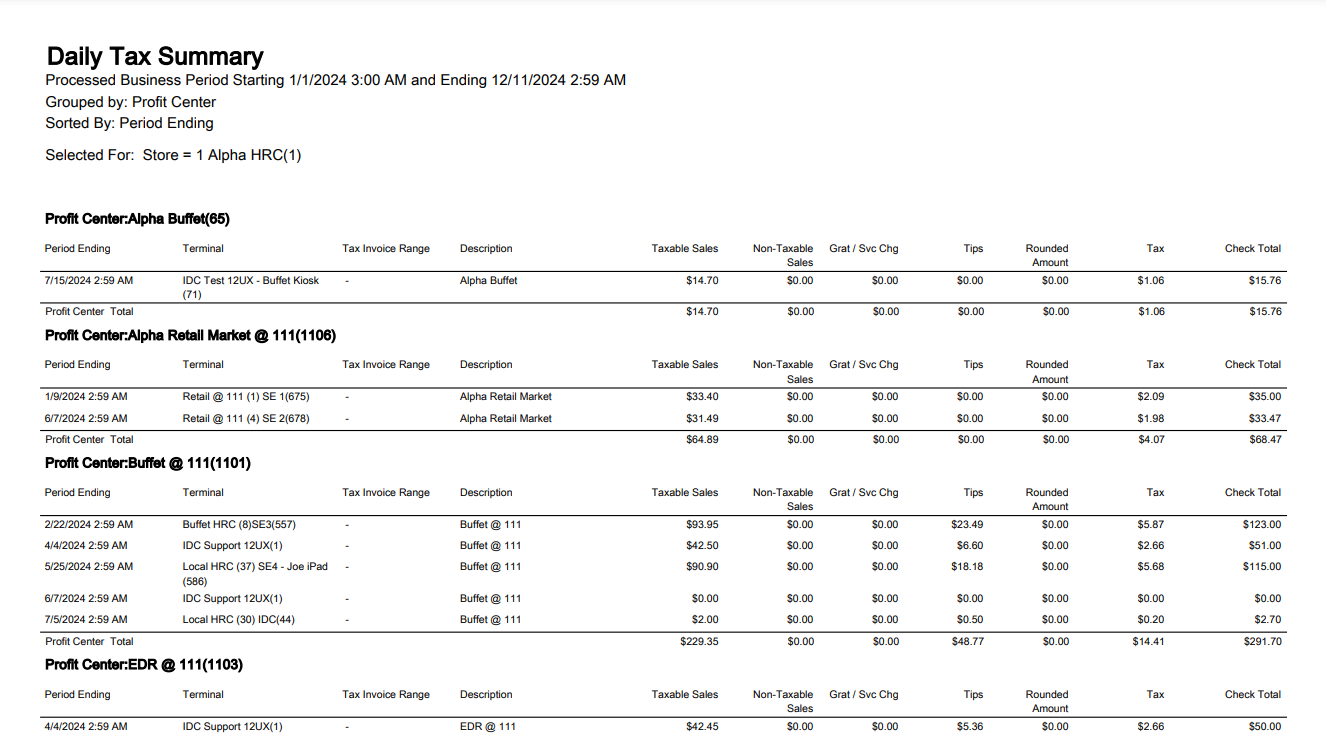
|
Field |
Description |
|---|---|
|
Period Ending |
The date range for each row is the business period for which the listed period date and time is applicable. |
|
Terminal |
Lists the terminal name. This column does not display when filtering by terminal. |
|
Tax Invoice Range |
The last 5 digits of every Tax Invoice number represents the sequential portion of that Tax Invoice number. The Tax Invoice range shows the beginning and ending sequential numbers used for a given date. |
|
Description |
Lists the Profit Center Description. |
|
Taxable Sales |
Total all taxable activity for a given date. This includes sales, discounts, service charges, etc. |
|
Non-taxable Sales |
Total all tax-exempt activity for a given date. This includes sales, discounts, service charges, etc. |
|
Grat / Svc Chg |
Lists service charges and gratuities associated with the check, if any. |
|
Tips |
Lists all tips associated with the check, if any. |
|
Rounded Amount |
Lists the rounded amount of the check when applicable. |
|
Tax |
Lists the tax amount of the check. |
|
Check Total |
Lists the total of the check. |
Daily Tax Summary Report
|
Grouping Levels (2 possible) |
Sorting Choices |
Filters |
|---|---|---|
|
Profit Center * |
Check Total |
Profit Center |
|
Business Period |
Description |
Profit Center Group |
|
Profit Center Group |
Terminal |
Terminal |
|
Terminal |
Period Ending* |
|
|
* = default setting |