


Cashier Performance
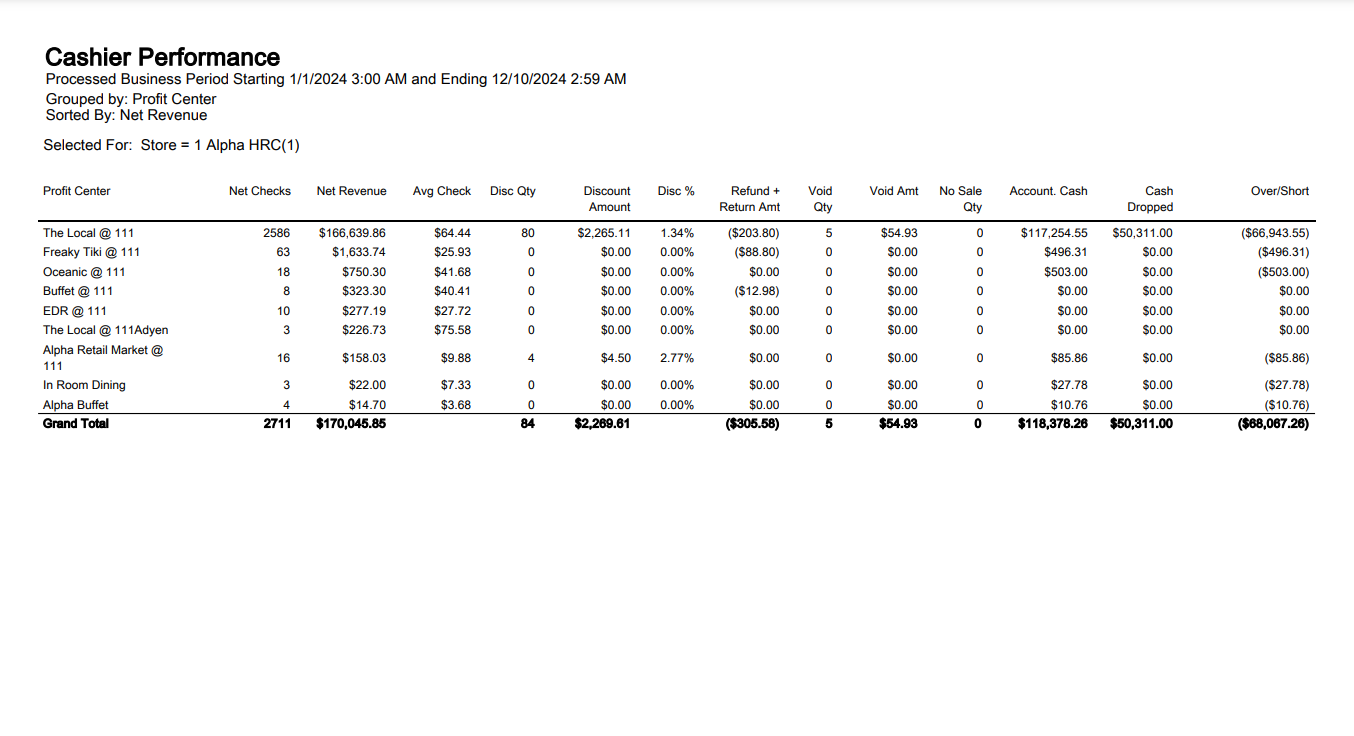
The Cashier Performance Report is designed for the store-level manager and shows data for a single store only. It provides a broad range of summary-level performance indicators for each cashier, grouped to reflect general performance categories.
|
Field |
Description |
|---|---|
|
Net Checks |
The total quantity of non-refunded checks. The formula is: Net Checks = Total Checks – (Open Check Refunds) – (Closed Refund Checks*2) |
|
Net Revenue |
The total of this line for all cashiers matches the Tender report when it is run for the same parameters (business period and profit centers). Net Revenue = Gross Revenue – Discounts |
|
Avg Check |
This is the Average Net Revenue per Net Check and is calculated as follows: Avg. Check = Total Net Revenue ¸ Total Net Checks |
|
Disc Qty |
The quantity of all discounts applied by the cashier (either at the item or check-level). |
|
Discount Amount |
The amount of all discounts applied by the cashier. |
|
Disc % |
The percent of gross revenue given as a discount. If $100 of gross revenue is recorded, and $10 in discounts were applied by the cashier, the Discount % is 10% (100¸10). |
|
Refund + Return Amt |
The amount of all open and closed check refunds performed by the cashier, plus the amount of all item returns performed by the cashier for the period. |
|
Void Amount |
The amount of all voids performed by the cashier. |
|
No Sale Quantity |
The quantity of No Sales performed by the cashier. |
|
Account. Cash |
The expected amount of physical cash tenders on hand that the cashier or server-banker is responsible for. The total of this line for all cashiers matches the Tender report when it is run for the same parameters (business period and profit centers). The formula is: Accountable cash = (Total Tenders – Change) + Loans – Withdrawals – Tips Paid – Non-cash Tenders |
|
Cash Dropped |
The amount of physical cash deposited by the cashier. The total of this line for all cashiers matches the Tender report when it is run for the same parameters (business period and profit centers). |
|
Over/Short |
The amount that the server is over/under after performing their cash drop. The calculation is: Over/Short = Cash Drop – Accountable Cash |
|
Grand Total |
The grand total of each grouping subtotal. |
Cashier Performance Report
|
Sorting Choices |
Grouping Levels (3 possible) |
Filters |
|---|---|---|
|
Net Revenue * |
Profit Center * |
Cashier |
|
Discount % |
Business Period |
Meal Period |
|
Discount Amount |
Cashier |
Profit Center |
|
Discount Quantity |
Meal Period |
Profit Center Group |
|
Name (last name, first name) |
Profit Center Group |
Store |
|
No Sale Quantity |
||
|
Over/Short |
||
|
Refund Amount |
||
|
Refund Quantity |
||
|
Void Amount |
||
|
Void Quantity |
||
|
* = default setting |