


Configure Permissions for the Child Enterprise
Select the appropriate parent enterprise in Context Selection prompt.
Navigate to POS Configuration ➜ Administration ➜ Enterprise.
Select the appropriate child enterprise for which the permissions are to be configured.
Navigate to the CCM2 Configuration submenu. This section is available only when the child enterprise is selected in the parent enterprise.
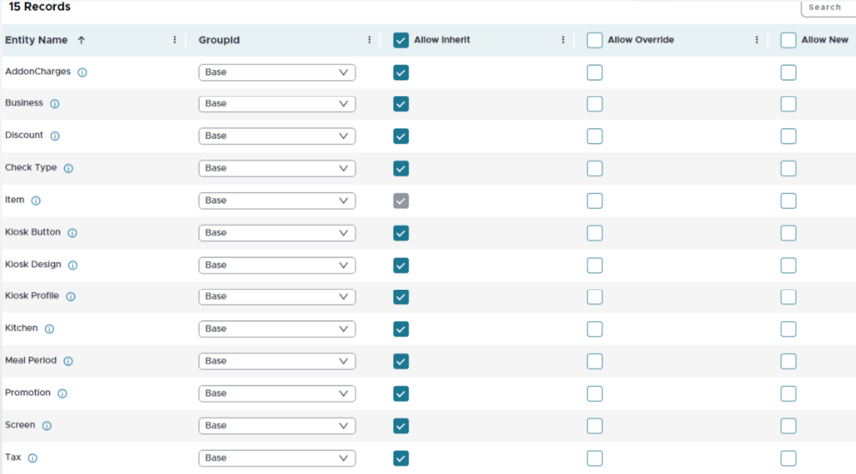
It displays the list of entities, along with the following options which allow the user to configure inheritance, override, and accessibility permissions for the child enterprise:
-
Allow Inherit -
-
When this option is enabled, the child enterprise is allowed to inherit the records configured in the menus mapped to the entity.
-
For example, if this option is enabled for the Business entity, all records created in the Lockout Period menu which is mapped to the Business entity in the parent enterprise are inherited by the child enterprise. If an individual record has the Exclude for Child Enterprise option enabled, it cannot be accessed in the child enterprise even if the Allow Inherit option is enabled for an entity, and the record is inherited by the child enterprise.
-
For Items and Tender entities, the Allow Inherit option is enabled by default, and the records from these entities are inherited by the child enterprise.
-
-
Allow Override
-
When this option is enabled, the child enterprise is allowed to override the records inherited from the parent enterprise. The Allow Override option can be enabled only if the Allow Inherit option is enabled. This is applicable only for the records configured in the menus mapped to the entity.
-
For example, if this option is enabled for the Business entity, the records created in the Lockout Period menu can be inherited and overridden by the child enterprise. If an individual record has the View only in Child Enterprise option enabled, it cannot be overridden in the child enterprise even if Allow Override is enabled for an entity.
-
-
Allow New
-
When this option is enabled, the child enterprise is allowed to create new records in the menus that are mapped to the entity. The records that are created in the child enterprise are not centrally available and can be accessed only from the child enterprise.
-
For example, if this option is enabled for the Business entity, a new lockout period can be created in the child enterprise.
-
Select the appropriate configuration group in the Group ID field. For example: If Base is selected, the child enterprise can inherit or override only the records (in the appropriate menus) that are assigned with the base configuration. If any configured CCM2 group is selected, the child enterprise can inherit or override only the records (in the appropriate menus) that are assigned with the CCM2 groups configurations.
This screen does not display the Hardware entity as it has no base or group configurations and is commonly used. A record created in this entity can still be inherited by a child enterprise if it is mapped to any of the records that belong to entities that have group and base configurations.
Select Save.