


IAS Postings in IGCM
IGCM has been enhanced to display IAS event postings for PMS and Loyalty adapter types. Each posting is displayed with the event status, allowing users to manually retry only the failed postings. The retry mechanism is supported for both global and local IAS.
Supported Events
The following table provides information on the supported events for PMS and Loyalty adapters:
|
PMS |
Loyalty |
|---|---|
|
Sale |
Redeem |
|
Refund |
Accrual |
Changes Made in IGCM
To support this, a new utility, IAS Postings, has been added to the Utilities module.
Configurations in IGCM
Navigate to Utilities ➜ Utilities ➜ IAS Postings.
Refer to the following table and fill in the fields:
|
Field |
Description |
|---|---|
|
Adapter Category |
Select the appropriate adapter category. The following are the available options:
|
|
Adapter Subcategory |
Select the appropriate adapter subcategory. The following are the available options when PMS is selected as Adapter Category:
The following are the available options when Loyalty is selected as Adapter Category:
|
|
Event Type |
Select the appropriate event type. The following are the available options when PMS is selected as Adapter Category:
The following are the available options when Loyalty is selected as Adapter Category:
|
|
Event Status |
Select the appropriate event status. The following are the available options:
|
|
Start Date |
Select the start date from which IAS postings must be displayed. Maximum Range - 180 days. |
|
End Date |
Select the end date up to which IAS postings must be displayed. |
Select Search to view IAS postings based on the selected filters and date range.
Sample IAS Postings
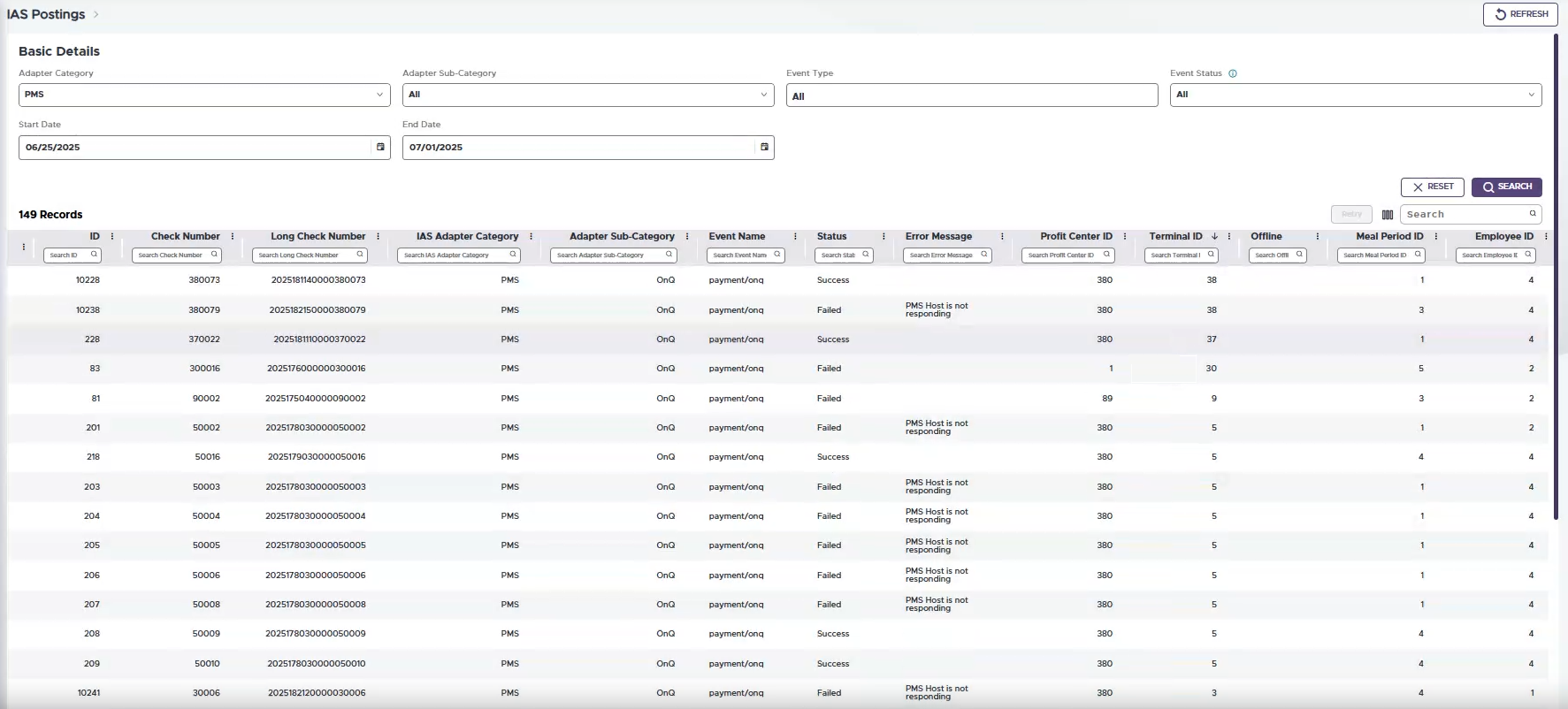
The following table shows the columns displayed for the IAS postings. However, users can select the Column Customization icon to display only the preferred columns. Also, the Retry option can be selected to retry postings for failed events:
|
Field |
Description |
|---|---|
|
ID |
The event ID. |
|
Check Number |
The check number. |
|
Long Check Number |
The long check number. |
|
IAS Adapter Category |
The adapter category. |
|
Adapter Subcategory |
The adapter subcategory. |
|
Event Name |
The event name. |
|
Status |
The status of the event. |
|
Error Message |
The error message, if applicable. |
|
Profit Center ID |
The profit center ID. |
|
Terminal ID |
The terminal ID. |
|
Offline |
|
|
Meal Period ID |
The meal period ID. |
|
Employee ID |
The employee ID. |
|
Account Number |
The guest account number, if applicable. |
|
Tender ID |
The tender ID. |
|
Tendered Amount |
The tendered amount. |
|
Revenue |
The gross total of the check. |
|
Gratuity |
The gratuity applied to the check. |
|
Service Charge |
The service charge applied to the check. |
|
Tip |
The tip applied to the check. |
|
Tax |
The tax applied to the check. |
|
Discount |
The discount applied to the check. |
|
Transaction Time |
The timestamp of the event. |