


12.3.15.7
Rounding Information in MHGL Extract
InfoGenesis POS has been enhanced to include rounding data in the MHGL extract and present a more detailed classification of the check financials in the extract.
When the Rounding class is selected for a profit center, all checks containing rounding adjustments are included in the extracted data.
Changes Made in IGCM
-
A new general ledger class, Rounding, has been added to the Class drop-down list.
Generating Extract with Rounding Data
Sale
-
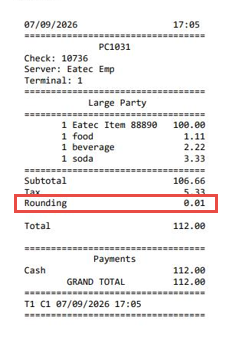
If the check total is rounded up, the rounding amount is denoted with a negative sign under the Rounding column in the extract for all sale transactions.
-
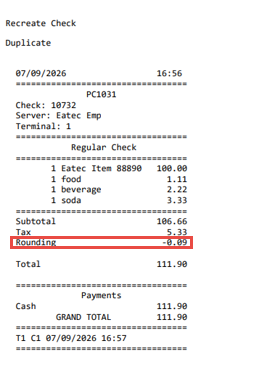
If the check total is rounded down, the rounding amount is denoted with a positive sign under the Rounding column in the extract for all sale transactions.
Refund
-
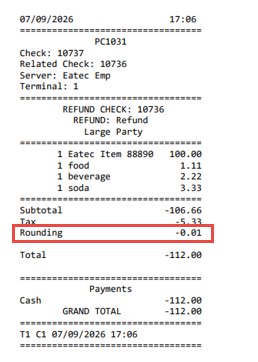
If the check total is rounded up, the rounding amount is denoted with a positive sign under the Rounding column in the extract for all refund transactions.
-
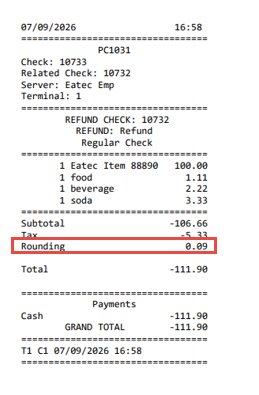
If the check total is rounded down, the rounding amount is denoted with a negative sign under the Rounding column in the extract for all refund transactions.
Navigate to Utilities ➜ Utilities ➜ General Ledger Mapping.
Refer to the table and select the following options:
|
Drop-down List |
Option |
|---|---|
|
Type |
Select MHGL. |
|
Profit Center |
Select the appropriate profit center. |
|
Class |
Select Rounding. |
Select Get Data.
Navigate to Reports ➜ Scheduling ➜ Task Setup.
Run the General Ledger export task for the required business period.
Navigate to Utilities ➜ Utilities ➜ Task Manager.
Select the Completed tab to view and download the task.
Rounding Up - Sale
Sample Check
Extract

Rounding Up - Refund
Sample Check
Extract

Rounding Down - Sale
Sample Check
 \
\
Extract

Rounding Down - Refund
Sample Check
Extract
